
News
What’s new in Split3r
Open a release to explore its changes, demonstrations and fixes.
Split3r 1.5.0 RC2
Second release candidate: very large files open and analyze much faster, the pieces of a messy model are sorted before the analysis, repairs keep every piece, you choose the direction of an interlocking, Pre-Split cuts equal pieces, and Automatic Slicing arrives for print services.
Sort the pieces of a model before analyzing it
Some files are made of many separate pieces: a scan, a merged assembly, a model found online. When you click Analyze on such a file, Split3r now counts its pieces and shows them in colours first: each large body in its own colour, the inner shells in the colour of the body that holds them, the small fragments in red, and in orange the pieces that are not worth keeping.
A slider sets the limit between a large body and a fragment, and the counts follow as you move it. Click a piece to look at it alone, right click to drop it or keep it. Then choose: one file per large body, one file with all the large bodies, or keep everything.
Nothing is lost: the original file and the dropped pieces go to the backup folder, and CTRL + Z undoes the sorting. On a 1 GB scan made of 84,000 pieces, it takes about half a minute. A model made of a single piece goes straight to the analysis, as before.
Very large files: open in seconds, analyzed in minutes
A 1 GB STL now appears on screen in a few seconds, instead of more than two minutes. Its analysis went from 37 minutes to about 5, with the same results, and the progress box names each step.
Models made of thousands of small pieces, which could keep the analysis busy for hours, are now handled in a reasonable time. Clicking a very large file in the Workzone no longer freezes Split3r, and Simplify starts without reading the file a second time. Opening the same file again, a Restore or CTRL + Z are immediate.
Faster repairs that keep every piece
Organic and AI repairs are up to three times faster on damaged models: on our test model the repair went from 6 minutes 35 to 2 minutes 15, with the same result.
Repair #2 now repairs each body of a file on its own and keeps them all; it used to keep only the largest one. Hollow parts stay hollow: a part hollowed with AutoShell no longer comes back filled by the slicer after a Mechanical repair. The progress box shows where the repair really is, for example "Repairing piece 12 of 48".
Extract: choose the direction of the interlocking
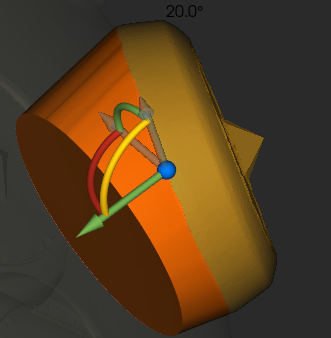
During the Interlocking preview, handles now sit on the border curve you are editing. They lean the interlocking rim, so you decide in which direction the piece slides in and out, up to 90 degrees. The rim follows the mouse, by steps of 5 degrees, 1 degree with CTRL, freely with SHIFT.
Each border keeps its own direction, Reset direction brings back the automatic one, and the extraction uses exactly what the preview shows.
Pre-Split: equal pieces, and sizes that really fit your printer
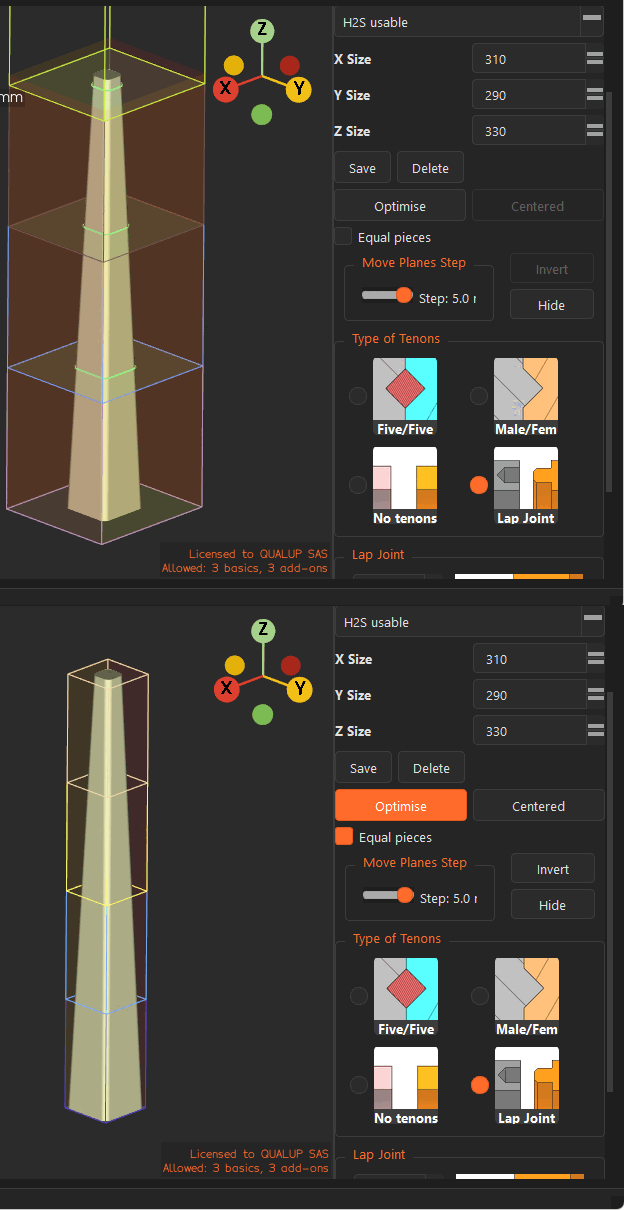
A new "Equal pieces" box gives every piece the same size. Without it, a 1000 mm model cut at 333 mm gives three pieces of 333 mm and a 1 mm sliver. With it, Split3r keeps the smallest number of pieces and makes them equal: four pieces of 250 mm.
With a Lap Joint or male/female tenons, the sizes you enter are now the size of the finished piece, lip or tenon included. You no longer need to enter sizes smaller than your printer to leave room for them, and the sizes no longer change when you switch between joint types.
Split3r also warns you when the tenon size and the tenon margin do not go together, and gives the advised value. It changes nothing by itself.
Automatic Slicing: split, slice and quote a folder of models in one click
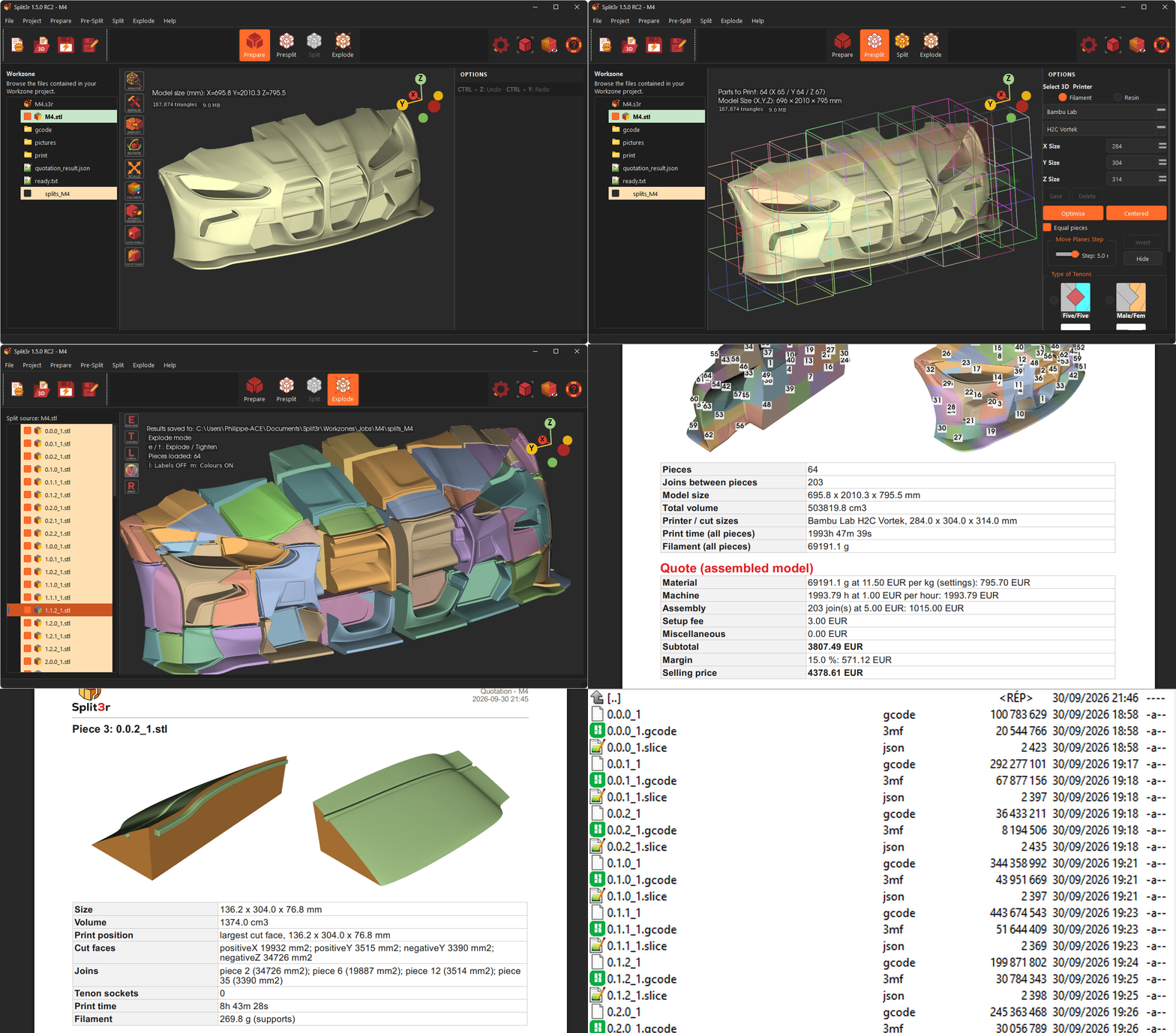
For print services and anyone who has to quote large models: Split3r can now process a whole folder of models on its own. It splits each model, turns every piece into its print position, has it sliced by Bambu Studio or OrcaSlicer with your own settings, and works out a price. For each model you get a PDF quote with an assembly guide, pictures of every piece and the G-code files. A model that fails does not stop the others.
Three new entries at the top of the Project menu start it. This function requires a Full License.
Small comforts
- Two new entries in the Project menu open the folder of the current Workzone and the folder of your Split3r settings.
- The Rotate, Scale, AutoShell and Cut bars sit where they should when Windows enlarges the display to 150 or 200 %.
- When an Offset cannot be built, the message now says so plainly and asks you to change the value, up or down.
- Analyze and Rotate have their tooltips.
Fixes
- Windows RC1 and macOS: Simplify was about twenty times slower than it should be, because a component was missing from the installer. It is back, and every installer is now checked before it reaches you.
- The text of the start-up screen was cut in some languages.
- License window: text cut off, and a "Quit" button wrongly worded in 27 languages.
- macOS: "General Parameters" was missing from the Project menu.
- Extract: an empty "Sewing the cap..." box could appear a few seconds after an Offset preview.
- Explode: leaving the exploded view while the painted colours were still loading could close Split3r.
- Linux: the AppImage stopped at start-up on some recent distributions.
Coming soon: automatic quotation and slicing
The next Split3r RC adds Automatic Slicing: drop in a model and get it split, oriented for printing, sliced, priced and assembly documentation is created, in a few minutes.
Quoting a large model takes hours: split it, orient every piece, slice each one, add up print times and filament, count the joints, then write the quote. Automatic Slicing does all of it in one pass, from the Workzone settings you already use.
For every model you get the pieces turned into their print position, the G-codes from Bambu Studio or OrcaSlicer with your own profile, the price line by line, a PDF quote with the assembly guide and one card per piece, and a data file for your own system. It starts from the menu, from a watched folder or from the command line, and it keeps going when a file fails.
Automatic Slicing arrives in the next version of Split3r as a beta. The full presentation is on the Automatic Slicing page. Customers who want to try it now can write to support@split3r.com.
Split3r 1.5.0 RC1
First Release Candidate of the 1.5.0 series: cut along a curve drawn on the model, a faster and watertight Cut by plane, a few comfort settings, 36 languages up to date, and the fixes found while distributing b8 on the three platforms.
Performance Improvement
Measured by Split3r on Windows 11 with an Intel N150, 4 cores / 4 threads, 16 GB RAM and a 500 GB SSD. These are workload-specific measurements, not a guaranteed speed on every computer.
Published performance measurements
| Operation | 1.5.0 b7d | 1.5.0 RC1 | Speed-up |
|---|---|---|---|
| Precise color calculation · 950,000 painted faces | 415 s | 3.3 s | ×128 |
| Color re-encoding after Simplify · 475,000 faces | 43 min 45 s | 30–50 s | up to ×87 |
| Offset preview · 70,000 selected faces | About 10 min | 10–13 s | ~×50 |
| Smart Selection · one slider step, 3 million faces | 50–82 s | 3.5 s | ×16–23 |
| Painted 3MF import · 3 million faces | About 7 min¹ | 38 s | ~×11 |
| Exploded view · painted model, 36 parts | 145 s | 15–17 s | ×9 |
| Painted 3MF import · 950,000 faces | 126 s | 16 s | ×7.9 |
| Clean · 1,860,000 selected faces | 141 s | 26 s | ×5.4 |
| Clean · 428,000 selected faces | 31.5 s | 8.3 s | ×3.8 |
¹ The 3-million-face import time for b7d is an estimate; that size was not benchmarked on b7d.
Cut along a curve drawn on the model
The Spline mode of Cut by plane now starts in "Closed curve" mode: click points on the surface of the model, rotate the view freely to reach the hidden side, and the curve closes itself from the fourth point. The cut follows a smooth surface stretched on that curve, so a limb, a head or any part comes off along the line you draw on the skin, instead of a straight plane seen from the screen. The same pyramidal tenon as the Patch mode can be added on the cut face.
Preview first, then cut exactly what you saw
In closed mode, Preview computes the whole cut and shows it: cut faces in blue, tenon in place, model turned translucent. Invert or resize the tenon without recomputing the cut, then Cut writes the pieces exactly as shown. The cut runs in the background with a progress bar and a Cancel button. Every curve you cut with is saved in the workzone with a picture of the view, ready to reload, rename or delete.
Parts that are joined somewhere else
When the part inside the curve, or beyond the plane, is still attached to the model elsewhere (a hand resting on a hip, an arm on a thigh), Split3r no longer writes meaningless files. It tells you, and offers to add another curve or to pre-cut with the two faces kept 0.05 mm apart, invisible when printing: the part comes off cleanly once the other connection is cut, each piece already capped.
A faster, watertight Cut by plane
Cut by plane now uses the Split engine: about 2 s instead of 11 s on a one-million-triangle model. Each cap is built on the exact points of the cut edge, so the pieces are watertight by construction, and painted models keep their color per triangle across the cut. The cut bodies go to the workzone's _backup folder, like every other tool.
Small comforts
General Parameters is organised in three tabs and reopens on the tab you left. The gloss of the selected faces is now a setting (Display tab), useful when the selection is hard to see on a model of a similar color. The Scale fields come pre-filled with "mm", and a result above 5 m asks for a confirmation: a plain number is a factor, "400" makes the model 400 times bigger.
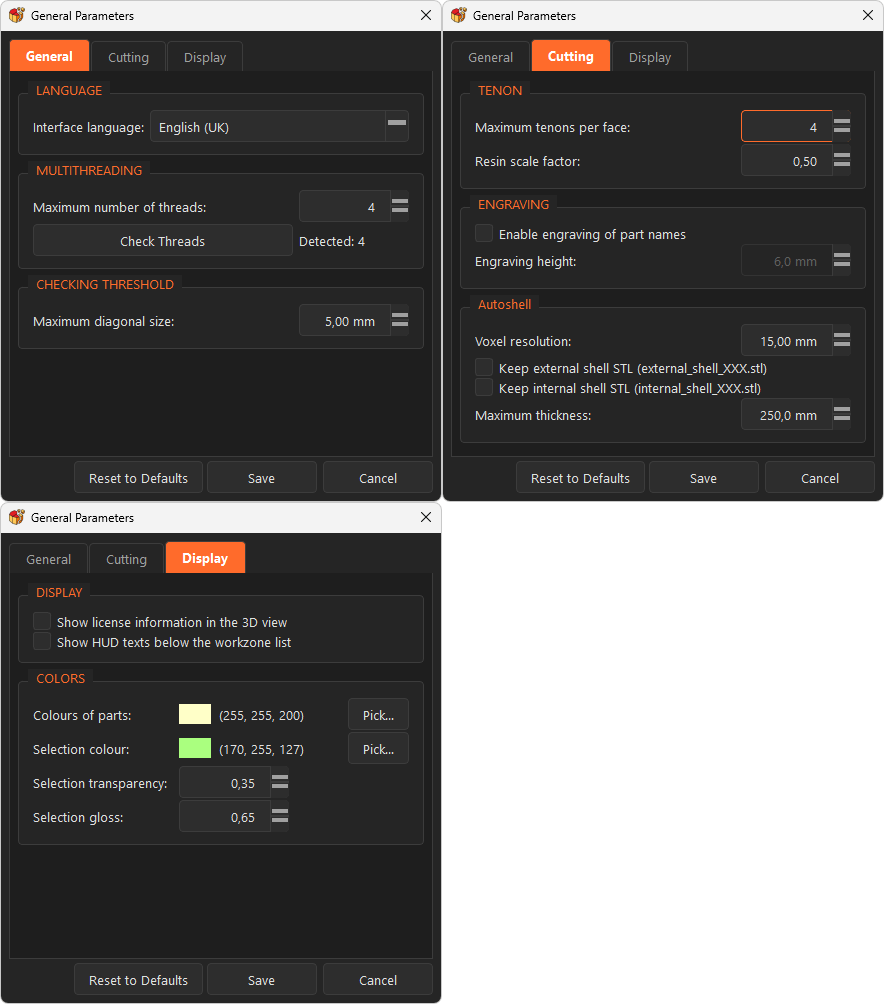
36 languages up to date
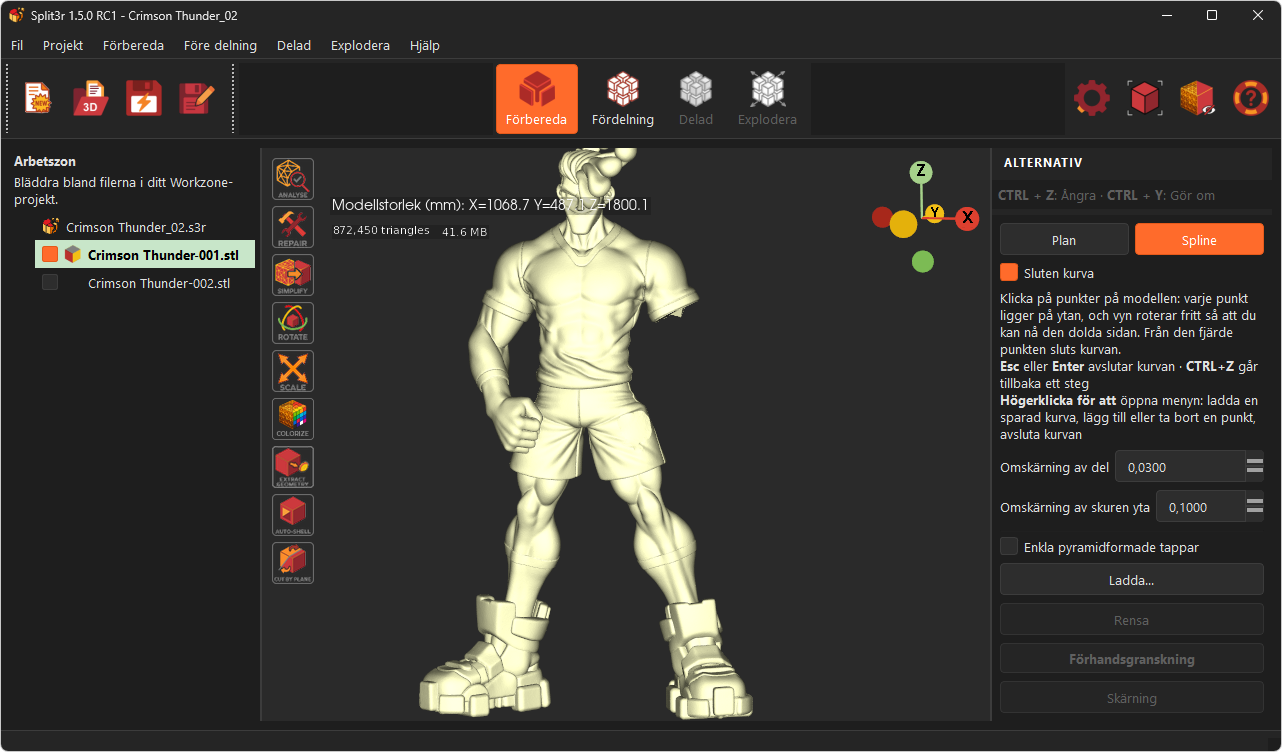
Every panel and message added during the 1.5.0 betas is now translated in the 36 supported languages. These are machine translations (Deepl Pro): please report a wrong word.
Fixes
- A freeze when clicking in the empty area of the view right after a cut, on models of a few million triangles.
- The update check offered b8 to RC1 users: beta, RC and release labels are now ordered as intended.
- macOS: the dark theme and the translations were not shipped inside the application.
- Patch preview coming back without any cap on damaged or AI-generated borders.
- Presplit closed by the system on a model scaled to 400 m by mistake; it now checks the size first.
- AutoShell lost the precise paint of the shell, and crashed when cancelled then closed; its previous bodies now go to _backup.
- A crash after Cut All on some hollow AI-generated models, present since b4.
- Debug mode: when the support asks you to start Split3r with the -d option, the application keeps a detailed log of everything it does, which helps us understand and fix a problem. That log is now also copied into the workzone's _logs folder when you close Split3r: sending your workzone to the support is enough.
Split3r 1.5.0 b8
This beta focuses on large-file performance, painted models and selection tools. Development continues toward the 1.5.0 release candidate.
Painted colors survive preparation
Repair preserves painting with both repair engines. Simplify transfers the painting onto the reduced mesh.
Selection you can keep working on
Smart Selection stops at already selected boundaries. Save a refined selection and reload it after restarting Split3r or changing Workzones.
Clean as you adjust
Leave Clean switched on while editing with the triangle brush or sphere. The border and the face/component counts refresh after each adjustment.
A reliable Patch preview
Patch preview is required before extraction. Extraction reuses that preview result; large closures are also faster.
A more comfortable 3D view
Rotation pivots around the point under the cursor. Status text can move below the Workzone tree. The Windows title bar follows the dark theme.
Display and processing fixes
The release addresses offset spikes on thin models, painted 3MF export tolerance, repair regressions, lap-joint matching and several closing/import issues.
Measured by Split3r on Windows 11 with an Intel N150, 4 cores / 4 threads, 16 GB RAM and a 500 GB SSD. These are workload-specific measurements, not a guaranteed speed on every computer.
Published performance measurements
| Operation | 1.5.0 b7d | 1.5.0 b8 |
|---|---|---|
| Precise color calculation · 950,000 painted faces | 415 s | 3.3 s |
| Color re-encoding after Simplify · 475,000 faces | 43 min 45 s | 30–50 s |
| Offset preview · 70,000 selected faces | About 10 min | 10–13 s |
| Smart Selection · one slider step, 3 million faces | 50–82 s | 3.5 s |
| Painted 3MF import · 3 million faces | About 7 min¹ | 38 s |
| Exploded view · painted model, 36 parts | 145 s | 15–17 s |
| Painted 3MF import · 950,000 faces | 126 s | 16 s |
| Clean · 1,860,000 selected faces | 141 s | 26 s |
| Clean · 428,000 selected faces | 31.5 s | 8.3 s |
¹ The 3-million-face import time for b7d is an estimate; that size was not benchmarked on b7d.
Split3r 1.5.0 b7d
August 21, 2026, Split3r version 1.5.0 b7d is available for download
While making an improvement to the file tree, I unfortunately introduced a bug in the Workzone visibility checkboxes of b7c and did not catch it before release: clicking the checkbox of an unselected file had no effect.
I sincerely apologize for the inconvenience this may have caused. The issue is fixed in b7d, please update. (Workaround in b7c: click the file name first, then its checkbox.)
Split3r 1.5.0 b7c
August 20, 2026, Split3r version 1.5.0 b7c is available for download
(Windows, macOS)
Split3r 1.5.0 b7c : Performance, stability, ring extraction
This build focuses on the bugs you reported, on performance and on overall stabilization, and adds new capabilities to Extract: multi-zone selection and ring extraction, with all the files created in one single operation.
Faster
- SmartSelection/Colorize starts about 4 times faster: about 3.5 seconds instead of 15 on a very small PC Intel N150.
- Colorize: saving a painting session with remeshing drops from about 60 seconds to 16, and the brush is about 4 times more responsive on complex colored models.
- PreSplit stays fluid while moving the planes, even with thousand preview boxes on screen (tested on a 19-metre piece / 3,500 split pieces).
- Explode handles results with hundreds of pieces without long waits.
Extract: multiple zones, ring extraction
Extract now supports multi-zone selection: select several zones, rings or not, and run one single Extract. All the pieces are created in one operation.
Ring-shaped selections (a collar around a neck, a ring around a spike) can now be extracted easily with interlocking joints:
- The ring becomes an Extract piece, and the region it encloses becomes its own piece, the joints nest back together.
- Several rings, and any mix of rings and ordinary zones, go through in the same single operation.
- Each border curve keeps its own settings (depth, conicity, swap side, or a flat Patch with its tenon), adjusted live in the preview.
Stability
- Joints are now verified closed before any file is written to the Workzone.
- In a multi-zone extraction, a zone that cannot be closed cleanly is skipped with a message while the others complete: the model
is never left half-cut.
- Fixed several minor bugs (graphical user interface, split, etc.)
Split3r 1.5.0 b7b
August 13, 2026, Split3r version 1.5.0 b7b is available for download
(Windows, macOS)
Split3r 1.5.0 b7b Bug fix version
Painting: two important fixes
The brush paints everywhere again. On surfaces seen at an angle, the brush could stop painting after the first stroke, forcing you to rotate the part to face it. This is fixed, whatever the viewing angle.
Painting and saving are much faster. Saving a painted model now takes about fifteen seconds instead of over a minute, the brush responds four times faster on large models, and undo is instant. Your files no longer grow needlessly with every save.
Extract: one important fix
A bug introduced in b7 could stop Extract from working. On some valid selections, Interlocking and Patch were refused with the message "This selection has concentric border curves (a ring shape)". Those selections were not rings: the check was wrong, and it is fixed in b7a.
If you are on b7 and Extract refused a selection, download b7b.
Split3r 1.5.0 b7
August 8, 2026, Split3r version 1.5.0 b7 is available for download
(Windows, macOS)
Split3r 1.5.0 b7
Where we are in the 1.5.0 cycle
This build should be the last beta of the 1.5.0 series. The next one will be the Release Candidate, and if it holds up in your hands, it will be followed by the 1.5.0 Release and by the updated demo version.
The Linux builds of 1.5.0 b7 will be published before the Release Candidate.
For mac users : macOS crash with macOS 26.5.1 & 26.5.2 (and maybe other versions) was not a Split3r bug and is fixed in the last version of macOS 26.6.1, more info here.
NEW COMMANDS
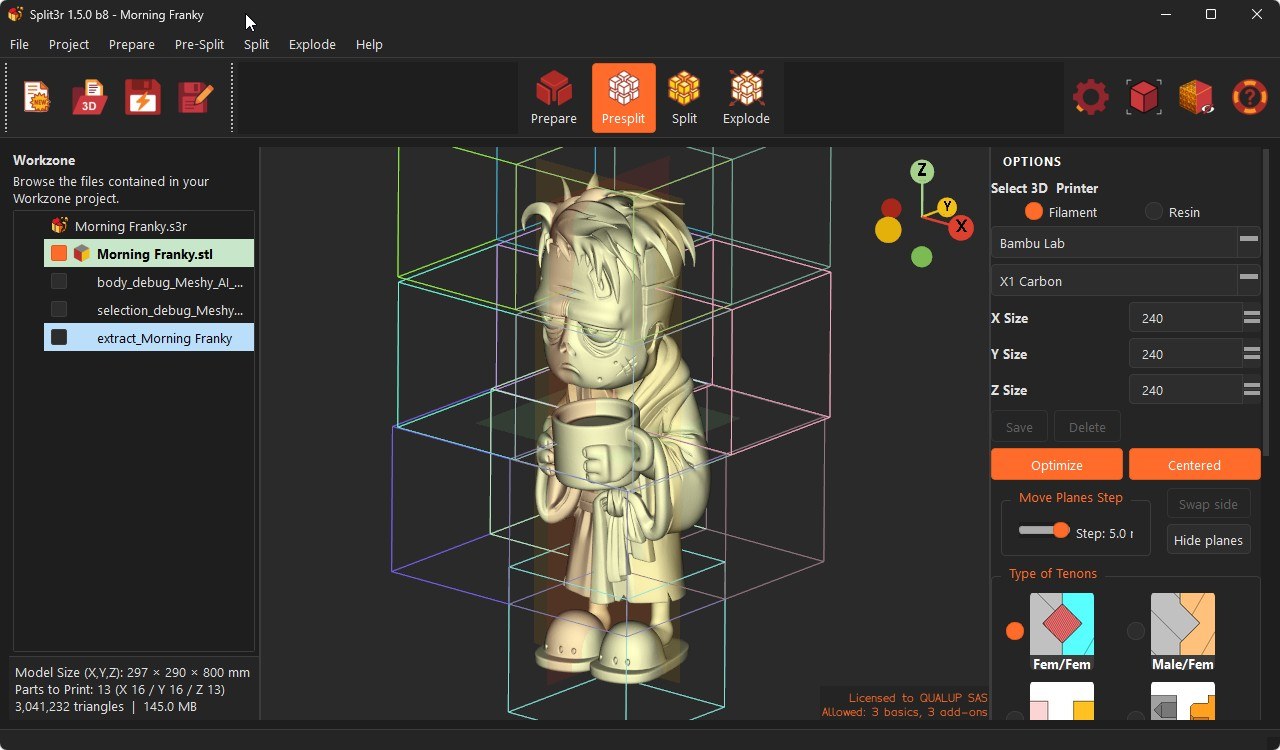
PreSplit : the parts to print are shown and counted, immediately
In standard grid mode
Split3r now draws the bounding box of every part that will really be produced and displays the count, as soon as you enter PreSplit. There is nothing to launch and no waiting: move a plane and the boxes and the counter follow.
Empty cells are skipped, so the count is the number of parts you will actually print, not the number of cells in the grid.
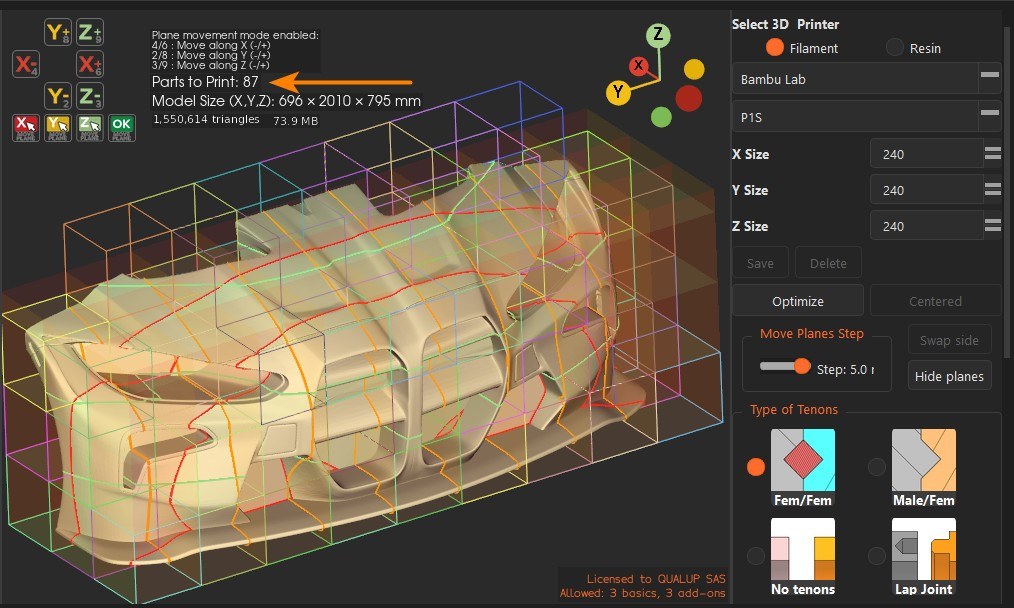
PreSplit, Optimized splitting: fewer parts to print
In standard grid mode
Instead of a fixed grid, the Optimize mode places printer-sized cutting boxes slice by slice, hugging the shape of the model.
On the models we tested, this reduces the number of parts to print by 5% to 27%, depending on the geometry.
Split3r compares the three axes and shows you the one that produces the fewest parts, with the count for each: "Parts to Print: 203 (X 207 / Y 212 / Z 203)". Every future part is drawn as a colored box before anything is cut.
One start plane per axis lets you shift the whole layout, and the slices can grow symmetrically from the middle of the model or be reversed side to side.
PreSplit : Split only the part of the model you want
In Optimized mode
Move a start plane past a region of the model and everything behind it is produced as a single uncut part, even if it is larger than your printer.
A detailed area can be kept whole while the rest is split, or set aside to be split later, in another workzone, for another printer...
All tenons are created on the large uncut part, compatibles with the tenons of the split parts.
Lap Joint: a joint for thin walls, and for thick ones
Lap Joint is a fourth joint option, next to Female/Female, Male/Female and No tenons. A thin lip protrudes from the cut face of one part and slides into the matching groove of the facing part. The two parts self-align along the whole edge, and the gluing surface is considerably larger than with tenons.
It was designed for thin-walled parts, where tenons either do not fit or come out too small to assemble, but it is not limited to them: the lip follows the outer skin of the model at an adjustable distance and never relies on the inner surface, so hollowed parts, solid parts and thick walls are handled the same way, whatever the wall quality.
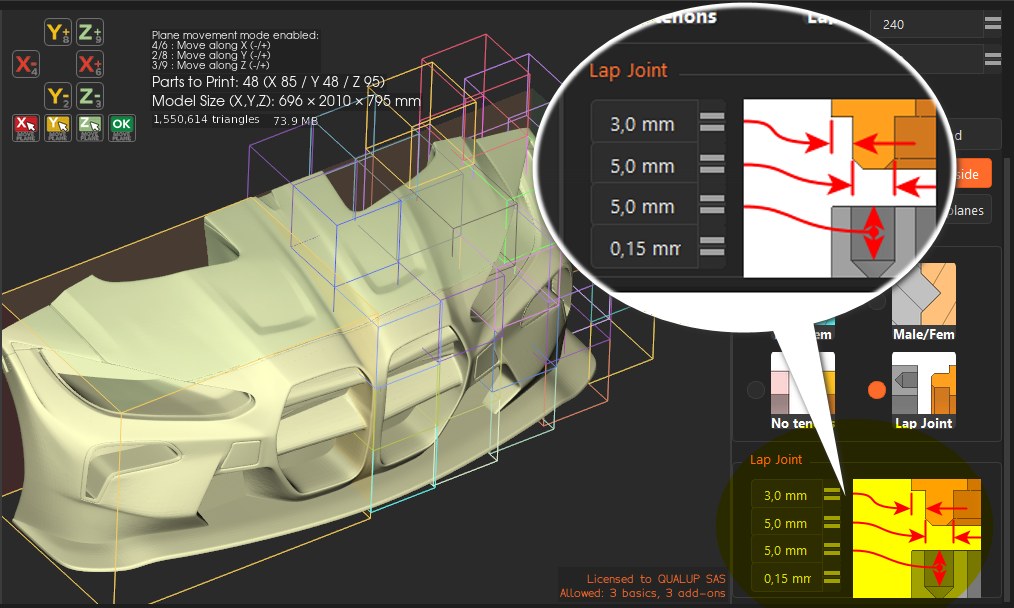
Four parameters, with a diagram: distance from the skin, lip width, lip height and clearance. The lip is chamfered for easy insertion and the groove is dug slightly deeper so the lip never bottoms out.
Where a wall is too thin, or a bevelled cut leaves too little material behind the face, the joint retreats or is skipped locally instead of piercing the part.
It works with the standard grid and with the optimized mode, where lip and groove segments match exactly across every joint.
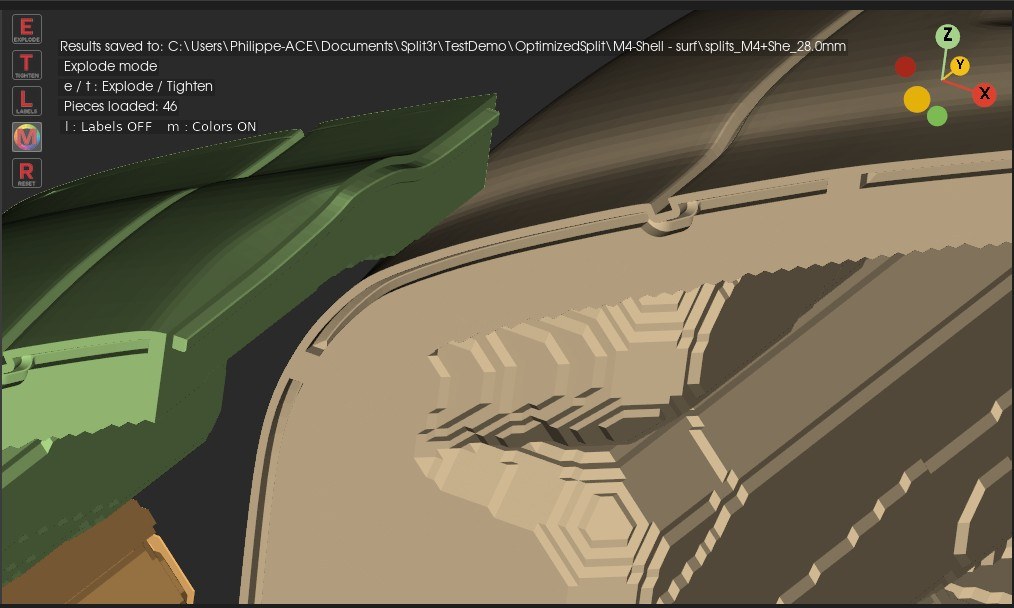
CUT BY PLANE: Lap Joint Option added
Same option than Pre-Split is added to Cut by Plane.
CTRL+Z and CTRL+Y work in Cut by Plane mode
CUT BY PLANE/SPLINE: Cut along a curve you draw
The command now has two modes. Next to the usual flat plane, a new Spline mode cuts the model along a free curve drawn directly on it: follow the shape of the part, hide a joint in a crease, or route the cut around a detail you do not want to cut through.
Click points on the model to draw the curve. It passes exactly through your points, and each one carries handles to shape the curve without ever creating a sharp corner.
The curve is swept in depth to form the cutting surface, shown in orange, and the resulting cut outline is drawn live on the model: you see exactly what will be cut before you cut it.
Double-click on the curve to insert a point, right-click one to delete it, drag any point or handle to adjust. The outline follows.
Ctrl + Z / Ctrl + Y undo and redo every step, including the last cut.
Every curve is saved with its cut and can be reloaded later (right-click > Load saved curve) to replay or adjust a cut. The curve is also written as PLY and DXF for use in a CAD program.
CUT BY PLANE/SPLINE: 3D gizmo on the curve
Right-click > Display gizmo places a manipulator at the middle of the curve, to adjust a cut without redrawing it. The outline follows.
The two arrows in the plane move the whole curve, the ring around the plane rotates it, and the two other rings tilt the cutting plane.
The depth arrow slides the curve through the part: the cut itself does not change, but the pivot moves, so you can tilt the plane around the point that suits your part.
Hide gizmo puts it away, and Ctrl + Z undoes a move.
IMPROVEMENTS
IMPROVED: Cut by Plane, results and panel
Cut pieces are written directly in the Workzone, named after the model and numbered by decreasing volume, instead of going into a sub-folder.
Cut All produces a single, continuously numbered set of pieces.
Ctrl + Z / Ctrl + Y undo and redo a whole cut from the panel; the files are moved to the backup folder rather than deleted.
The joint type selector has been redesigned as a compact 2 x 2 grid, and the Lap Joint is available in Cut by Plane as well.
A Quit button now closes the command once the cut is finished.
IMPROVED: PreSplit performance on very large models
Moving the planes and computing the boxes stays fast even on models of several million triangles: only what changed is recalculated, a progress bar appears on long computations, and the heavy work (tenon placementzones) runs only when you click Split.
IMPROVED: Explode is much faster on large results
On results with hundreds of pieces, the bulk commands of the tree (Hide others, Show all except selected, Ghost all, Set all opaque, Invert ghost) now refresh faster: a few seconds instead of minutes on a small PC.
Rotating and zooming the scene with labels displayed, and toggling the labels on/off, are also much faster (very much).
"Check all" is renamed "Show all".
IMPROVED: CTRL+Z and CTRL+Y (Undo/Redo) work in Cut by Plane mode, Cut by Spline, and several other commands
IMPROVEMENTS IN SEVERAL COMMANDS:
A lot of minor improvements in Analyse, Cut By Plane, Extract...
FIX
Explode: Invert selection now really inverts the visibility of the selected folder pieces (it used to end up showing everything).
Explode: "Zoom to whole piece" now works in Explode mode too (it used to re-frame the hidden Prepare view).
The "No tenons" choice is now saved with the project It used to reload as Female/Female when reopening the .s3r.
File “Bowser” courtesy of EON3D
Split3r 1.5.0 b6b
July 23, 2026, Split3r version 1.5.0 b6b is available for download
(Windows)
Split3r 1.5.0 b6b: Every option now explains itself
This update brings rich, slicer-style tooltips to the whole application. Hover any field, button or menu entry, in Extract, Colorize, Analyze, Presplit, Cut by Plane, Repair, AutoShell, Scale, Rotate or Simplify, and you get a clear explanation of what the option does, its concrete effect on your cuts and prints, and a recommended value to start from.
The Analyze panel goes further: each defect layer (holes, non-manifold edges, self-intersections, foldovers, collisions) now explains what the defect is and why it matters for printing.
Split3r 1.5.0 b6:
This release completes the program announced in June and July : it includes all the planned modifications, and in terms of features it is very close to the final 1.5.0 release.
The remaining work before the final version is stabilization, polish, based on your feedback, macOS, Linux version and translations.
New commands
Colorize: new Brush tool
Paint your models directly in Split3r, the way you would in your slicer, but with the comfort of a real 3D painting tool.
The Colorize command gains a true brush, powered by a completely new paint engine:
A precise, circular on-screen brush. The brush follows the surface of the model under your cursor, its size adjusts on the fly with Ctrl or Alt + mouse wheel.
Straight strokes on demand. Click-to-click mode draws clean, straight paint lines between two points, ideal for panel lines and sharp color separations.
A palette aligned with your printer. The 16-color palette matches your filament slots, so what you paint is what your slicer will assign.
Smooth triangles. Painted areas are automatically re-triangulated so the paint follows your strokes exactly, instead of snapping to the original mesh triangles. The full geometric detail of the model is preserved underneath the paint.
Paint that survives cutting. Brush strokes travel with the model: every piece produced by Extract, Cut by Plane or Split keeps its painting, ready to print.
The Colorize panel is now split into two modes:
Paint (brush) and Selection (existing tools).
Extract: new Offset cut for very complex surfaces
This is the big one for Extract. Until now, an extracted region could only be closed with a flat patch or an interlocking wall, which reach their limits on deep, strongly curved selections (a visor, a face, an organic shell).
Extract now analyses your selection and automatically switches to a new cut option: Offset. The Offset cut closes the piece with a surface that follows the original shape at a constant depth, producing a natural, even wall thickness, and handles extractions that were simply not possible before.
The switch is automatic but always under your control: Split3r asks before changing the cut type, and you can try the current mode anyway or cancel.
Split3r suggests an offset value computed from your selection; you can adjust it freely.
An interactive preview shows the resulting closing surface in place, on the model, before anything is cut.
Confirm to extract, or cancel at any time without touching the model.
Extract : Patch and tenon preview
Extractions with a Patch cut now show you everything before the cut happens:
Preview of the patch and its tenon in place on the model, so you see exactly what will be built.
Choose the tenon direction. A single checkbox inverts the tenon to point to either side of the patch.
Adjust the tenon size to match your part, directly from the preview.
Collision warnings. Split3r alerts you when the patch or its tenon would collide with the part, and suggests the appropriate way out, before anything is cut.
EXTRACT : Smooth border option
The border of a smart selection follows the triangle edges of the mesh, so the cut line is jagged.
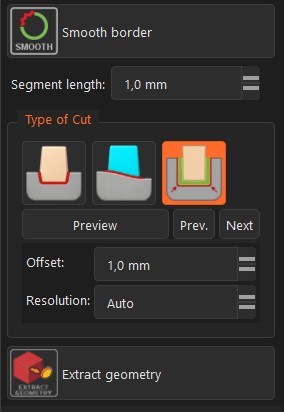
The new Smooth border button replaces it with a clean, smoothed cut line: the triangles along the border are rebuilt so the piece is cut exactly along that line.
Selections whose border forms several separate curves (the two rims of a glasses frame, for example) are now fully supported.
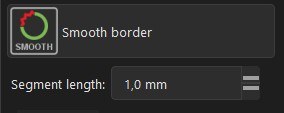
One click does everything: Split3r fills small holes, cleans the selection and applies the small geometry corrections automatically, without asking.
The preview shows the smoothed line and the rebuilt triangles On the model before you extract.
The segment length of the smoothed line is preset from the resolution of your own model, for evenly distributed triangles, you can adjust it (0.1 to 10 mm).
Works with every cut type (Interlocking, Patch, Offset).
Note: this command modify a bit the original geometry
EXTRACT : Several border curves, one extraction
Selections whose border forms several separate curves (the two rims of a glasses frame, for example) are now fully supported.
Every border curve is closed properly, on the piece and on the remaining body. Previously only the largest curve was closed and the others were left open.
New Prev. / Next buttons next to Preview step through the border curves, with the camera zooming automatically on the current one.
Cut types can even be mixed in a single extraction: an interlocking cone on one curve, a flat patch on another. The preview always shows the real result, curve by curve. The Offset type applies to the whole selection.
Tenons are available on every patch opening, each one sized to its own opening (previously only the largest opening received a tenon)
Ring-shaped selections (two concentric border curves) are detected: only the Offset cut can close a ring today, and Split3r tells you so instead of producing a wrong part.
Each curve can carry its own settings: interlocking depth and conicity, tenon size and direction.
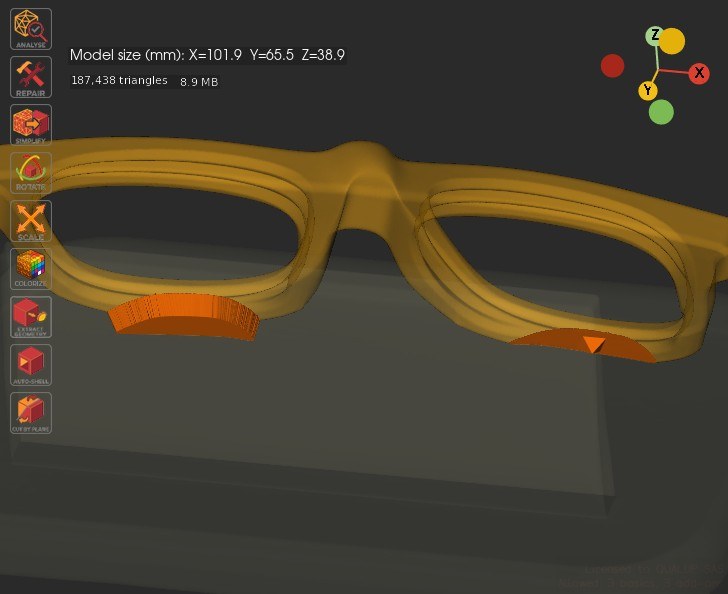
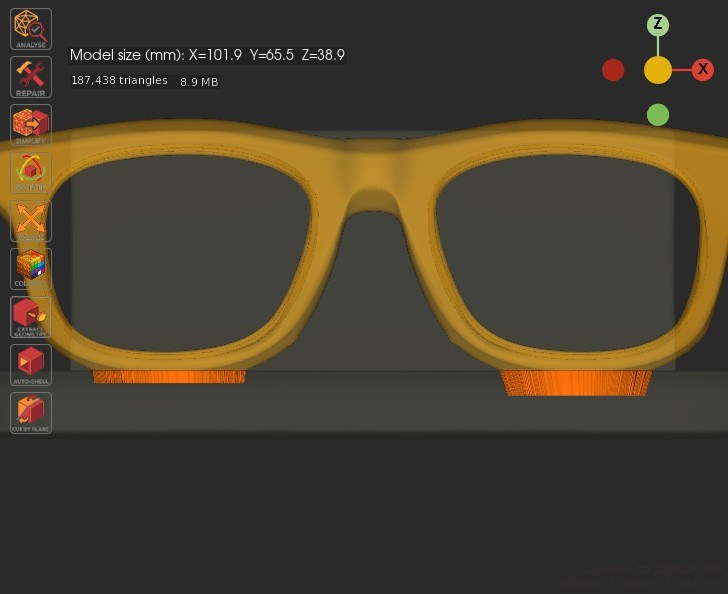
Main toolbar, two new buttons
Next to Help, always available :
"Zoom to whole piece" frames the entire model at any time (it replaces
the button that was inside the Analysis panel).
"Display triangles" shows the triangle edges of the displayed model.
Improvements
Reworked Painted 3MF models Kernel
Support for painted 3MF models (Bambu Studio, OrcaSlicer, PrusaSlicer) has been rebuilt from the ground up.
Handling of AI-generated models, often extremely heavily painted, is improved.
This is the deepest change of this update, and it pays off at every step of the workflow:
Much lighter models. Painting is now handled as a property of the model instead of being converted into millions of extra triangles. Heavily painted models load and display with a fraction of the memory they needed before.
Nothing is lost. Cut a painted model into pieces: every piece keeps its painting exactly, down to the finest strokes. This applies to Extract, Cut by Plane and Split alike.
Round-trip with your slicer. Exported pieces open in the slicer with the original painting and the original project settings intact, including multi-extruder setups. What you sliced before cutting is what you slice after.
Painted previews everywhere. The file tree and the Explode view now show pieces with their real painted colors.
Better import. 3MF import is faster, shows its progress, can be cancelled, and lets you resize the model (X/Y/Z) at import time.
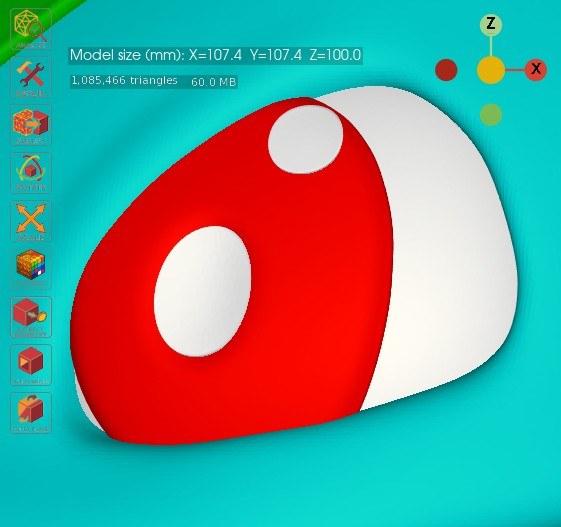
Smarter Extract
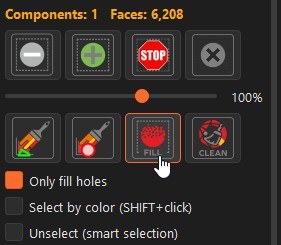
"Only fill holes" option. Fine-tune the automatic selection fill: close enclosed holes without swallowing the narrow tongues of your selection border.
Cut-type recommendation for every mode. The geometry analysis that drives the automatic Offset switch also recommends Patch when it fits the selection better than Interlocking, you always confirm before anything changes.
Refreshed options panel. The Extract and Colorize option panels have been reorganised for clarity, with the cut-type choices and their parameters grouped together.
Split
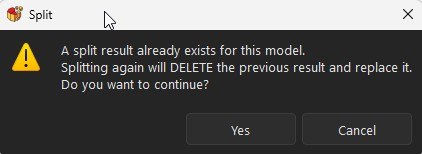
No more accidental overwrites. If a split result already exists for the model, Split3r now asks for confirmation before replacing it. Cancel keeps your existing pieces untouched.
Interface
On-the-fly resizing. The selection sphere and the brush circle now resize directly under the cursor with Ctrl or Alt + mouse wheel, without leaving the tool.
General improvements
Clean handles every border curve:
The Clean command now detects and corrects the staircase artefacts on ALL the border curves of the selection, not only the largest one.
Fill asks before filling very large enclosed areas
Enclosed areas bigger than the automatic limit are no longer skipped silently: Split3r shows their size and asks whether to fill them too.
Smart selection slider follows the selection
When an automatic selection stops by itself (for example at 15%), the propagation slider now moves to that value, so you can fine-tune from where the selection actually stopped instead of clicking on "+" / "-" buttons.
Bug fixes
Most of 3mf color bugs fixed.
Fixed occasional misalignment between the displayed colors and the actual selected faces when working on colored models in Extract.
Colors vs selection on colored models (Extract)
Fixed an occasional mismatch between the displayed colors and the actual selected faces when working on colored models in Extract.
Extracted pieces lost their smooth painted borders
Pieces created with Extract displayed their painted areas with jagged, stair-stepped borders instead of the smooth painted edges. Extracted pieces now match the original painting exactly.
"inverted faces" message after extraction
The message "inverted faces were detected in this mesh" no longer appears after an extraction: parts are now written correctly oriented in every cut mode.
Split3r 1.5.0 b6 - coming soon
July 22, 2026, Coming Very Soon : Split3r version 1.5.0 b6
Split3r 1.5.0 b6 is expected this week. This release is focused on full-color 3D printing, with a rebuilt engine for painted 3MF models, a brand-new painting brush, and a smarter Extract command on complex shapes and a lot of minor improvements.
Here is what it will bring.
New commands
Split3r 1.5.0 b5
June 29, 2026 - Version 1.5.0 b5 is available for Windows
NEW: Redesigned ANALYZE command (Prepare)
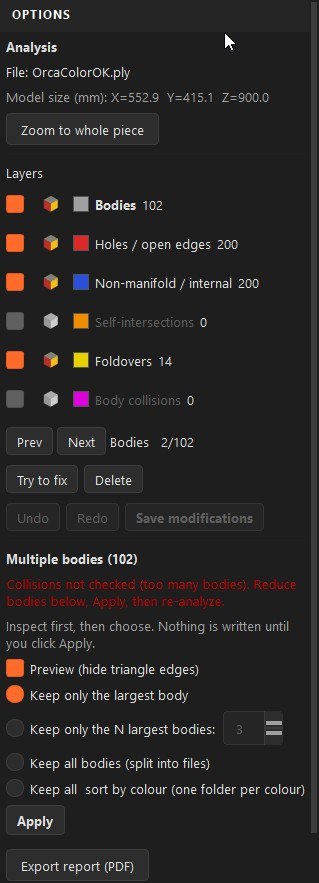
Analyze now has a full interactive Options panel on the right (like Colorize and Extract), replacing the old on-screen text. Run it from the Analyze tool in the Prepare toolbar.
HEADER
-Shows the file name and the model size.
-"Zoom to whole piece" re-frames the whole model at any time.
ONE ROW PER DEFECT TYPE
Bodies, Holes / open edges, Non-manifold / internal, Self-intersections, Foldovers, and Body collisions. Each row has:
-A check box to show / hide that layer in the 3D view.
-A transparency button (Workzone icon): toggles the layer between opaque and see-through, so you can inspect defects through the surface.
-A colour swatch matching the colour used in the view, and the defect count.
-A clickable label: click it to zoom on the first defect of that type, then use the Prev / Next strip to jump from one defect to the next. The active layer is shown in bold.
SINGLE-BODY DISPLAY
-The body is shown smooth by default. Tick "Show triangle edges" to display the wireframe.
MULTIPLE BODIES
When a file contains several bodies, a dedicated section lets you:
-Keep only the largest body, keep the N largest, keep all (split into separate files), or keep all & sort by colour (one folder per colour, coloured files only).
-"Preview" hides the triangle edges for a clean look while you inspect.
-Apply writes the result next to the source file; the original is kept, hidden with a leading "_" (reversible via Show hidden). Nothing is written until Apply.
-Navigate the bodies (click the Bodies label): the focused body stays opaque, the others dim. "Delete" removes the focused body from the piece and saves the cleaned result, keeping the original as a hidden backup.
-On very large assemblies the body-collision test is skipped automatically and the panel asks you to reduce the number of bodies first, then re-analyze.
TRY TO FIX (FOLDOVERS)
"Try to fix" repairs overlapping (folded-over) triangles directly in Analyze.
-It works on small foldover groups (up to 10 connected faces); larger groups are
left untouched.
-Each group is repaired only if it can be closed cleanly: the folded faces are removed and the hole is re-closed flat (a single triangle, or a constrained triangulation for larger holes). If a group cannot be closed safely it is left exactly as it was, Try to fix never leaves an open hole.
-On coloured models the patch takes the dominant colour of the hole border, and the border vertices are reused so the surface stays watertight.
-Work in memory with Undo / Redo (Ctrl + Z / Ctrl + Y). "Save modifications" writes the repaired model (new PLY, the original kept as a backup) and re-runs the analysis so the defect counts update.
Export PDF report
export a PDF report with screen captions of the defects in the Workzone, then displays it.
HEADER
-Shows the file name and the model size.
-"Zoom to whole piece" re-frames the whole model at any time.
ONE ROW PER DEFECT TYPE
Bodies, Holes / open edges, Non-manifold / internal, Self-intersections, Foldovers, and Body collisions. Each row has:
-A check box to show / hide that layer in the 3D view.
-A transparency button (Workzone icon): toggles the layer between opaque and see-through, so you can inspect defects through the surface.
-A colour swatch matching the colour used in the view, and the defect count.
-A clickable label: click it to zoom on the first defect of that type, then use the Prev / Next strip to jump from one defect to the next. The active layer is shown in bold.
SINGLE-BODY DISPLAY
-The body is shown smooth by default. Tick "Show triangle edges" to display the wireframe.
MULTIPLE BODIES
When a file contains several bodies, a dedicated section lets you:
-Keep only the largest body, keep the N largest, keep all (split into separate files), or keep all & sort by colour (one folder per colour, coloured files only).
-"Preview" hides the triangle edges for a clean look while you inspect.
-Apply writes the result next to the source file; the original is kept, hidden with a leading "_" (reversible via Show hidden). Nothing is written until Apply.
-Navigate the bodies (click the Bodies label): the focused body stays opaque, the others dim. "Delete" removes the focused body from the piece and saves the cleaned result, keeping the original as a hidden backup.
-On very large assemblies the body-collision test is skipped automatically and the panel asks you to reduce the number of bodies first, then re-analyze.
TRY TO FIX (FOLDOVERS)
"Try to fix" repairs overlapping (folded-over) triangles directly in Analyze.
-It works on small foldover groups (up to 10 connected faces); larger groups are
left untouched.
-Each group is repaired only if it can be closed cleanly: the folded faces are removed and the hole is re-closed flat (a single triangle, or a constrained triangulation for larger holes). If a group cannot be closed safely it is left exactly as it was, Try to fix never leaves an open hole.
-On coloured models the patch takes the dominant colour of the hole border, and the border vertices are reused so the surface stays watertight.
-Work in memory with Undo / Redo (Ctrl + Z / Ctrl + Y). "Save modifications" writes the repaired model (new PLY, the original kept as a backup) and re-runs the analysis so the defect counts update.
Export PDF report
export a PDF report with screen captions of the defects in the Workzone, then displays it.
NEW: COLORIZE (Prepare)
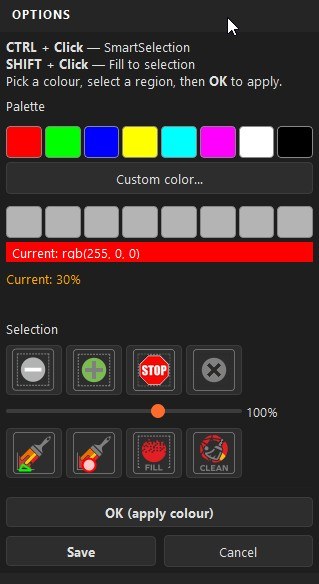
Paint any model by geometry, directly inside Split3r. Colorize uses the same Smart Selection engine as Extract, so you can isolate clean regions in some clicks.
-Click the Colorize tool in the Prepare toolbar (between Scale and Extract).
-Pick a colour from the 8-colour palette, or define your own with the colour picker (8 custom slots).
-Select a region: Ctrl + Click for an auto-tuned smart selection, Shift + Click to fill to the boundary, or use the Sphere / Paint brushes, the +/- tolerance, and Fill / Clean, exactly like Extract.
-Press OK to apply the current colour to the selection, then repeat for the next region. Reset (X) clears the current selection.
-Ctrl + Z / Ctrl + Y undo and redo your work (selection steps first, then applied colours).
Save writes a coloured model; the original file is kept as a backup. Re-opening an already coloured model keeps its existing colours, so you can come back and colour more later.
NEW: SELECT BY COLOUR & UNSELECT BY SMART SELECTION
(Smart Selection / Extract)
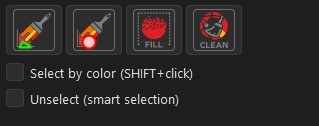
Two new check boxes under the Paint / Fill / Clean icons, in both Extract and Colorize:
-"Select by colour": Shift + Click selects the whole connected same-colour region (stops at colour boundaries), ideal for coloured models.
-"Unselect (smart selection)": smart selection removes the selected region instead of adding it.
Both reset when you leave the tool. Fill and Clean now show a busy cursor.
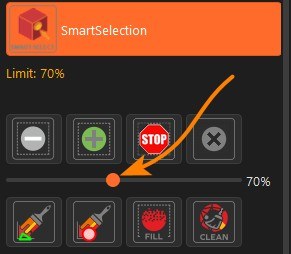
NEW: Smart Selection, propagation limit slider
(Extract and Colorize)
A slider between the two button rows sets a propagation limit for the smart selection.
Limit is between 5% and 150%.
Drag it and the selection re-propagates up to that limit (shown as "Limit: X%").
The -/+ buttons still fine-tune the current threshold ("Current: X%") and can go beyond the limit when needed.
RESTORED
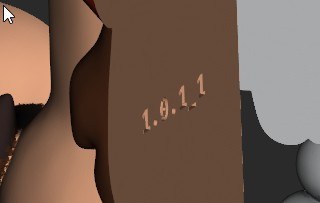
Part numbers engraved when splitting
Part-number engraving is back. It was lost earlier in the 1.5.0 series when the Blender step was removed. It now runs natively in Split3r's geometry engine, faster and more robust, with no dependency on a perfectly clean input mesh.
-Each piece is engraved with its number on its largest cut face, recessed (debossed), placed around the tenons, and following the geometry exactly, watertight and ready to slice.
-Text is sized from the engraving height in General Parameters and shrinks automatically if a face is small.
-Enable/disable it and set the height under General Parameters > Engraving.
IMPROVED
Blender fully removed
Split, Extract (tenons), Cut by Plane, AutoShell and Repair all run on the native geometry engine. Lighter installer, nothing extra to install.
Split engine, exact cut-face caps
The split engine now builds each cut-face cap from an exact contour read straight from the mesh.
Caps are more robust and watertight on complex models.
-Safety net: if the new engine ever causes a problem on a specific model, General Parameters > Split Engine lets you switch back to the previous, proven engine.
Tick "Use previous split engine (1.5.0 b4)" and re-split. It affects only the Split operation; the other tools are unchanged.
FIX
Colored 3MF export now opens correctly in OrcaSlicer
"Export WorkZone to colored 3MF" now produces a file that OrcaSlicer reads correctly: per-face colours are preserved, the original print settings captured at import are kept, and cut faces no longer bleed colour.
Previously the colours were not picked up when opening the 3MF in Orca.
Slit along a cube edge after capping
Fixed a thin slit that could appear along a straight edge between two adjacent cut-face caps, caused by an extraction tolerance that was too loose.
Split3r 1.5.0 b4
June 11, 2026 - Version 1.5.0 b4 is available for Windows, macOS and Linux
This release ships for the three platforms:
Windows (installer)
macOS (Apple Silicon, signed and notarized DMG)
Linux (AppImage, x86_64)
Better 3MF color import
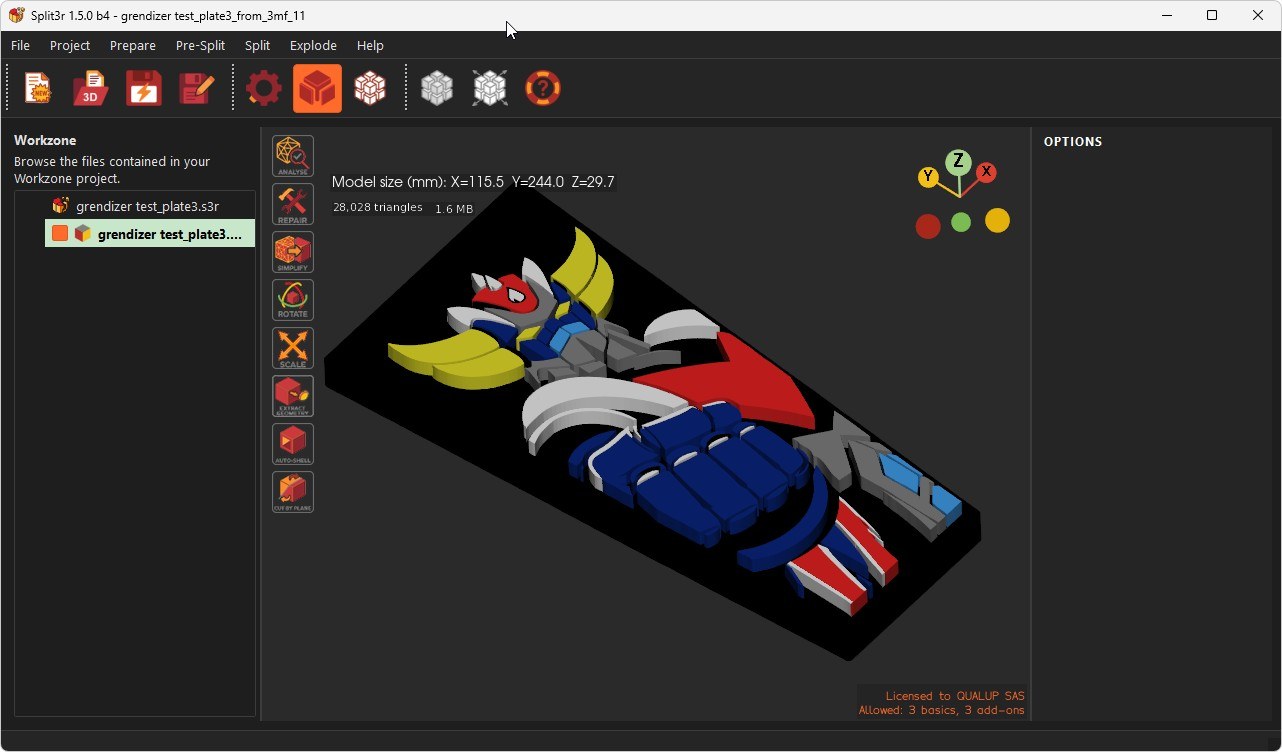
Split3r reads the colors you painted in your slicer and brings them onto your model.
BambuStudio and PrusaSlicer painted files are better supported now. If you painted a model in either slicer, the colors come through on import. (Each slicer uses its own on-screen palette, so the colors follow what's stored in the file.). If you get any problem, please fill a bug report, we will fix it.
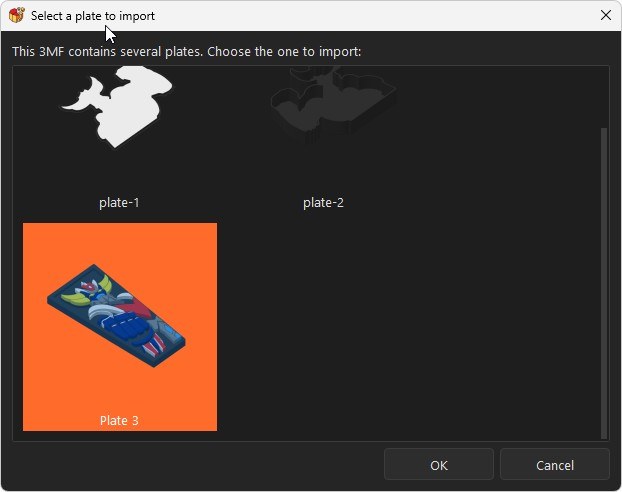
Multi-plate files: if your 3MF contains several plates, Split3r asks which plate you want to import and shows a preview thumbnail.
A real progress bar is shown while importing, so you can see it working instead of wondering if it froze.
Colors stay accurate when you cut
When you split or extract a colored model, the colors are now kept faithfully:
No more color "bleeding" across the cut.
Small painted areas no longer disappear.
Every piece keeps its real colors, all the way to export.
A clearer, color-coded Workzone
The Workzone tree is much easier to read at a glance.
Result folders are named by what made them and color-coded:
Green = the piece you're currently working on
Orange = Split results
Blue = Extract results
Violet = Cut by Plane results
Yellow = "sort by color" results
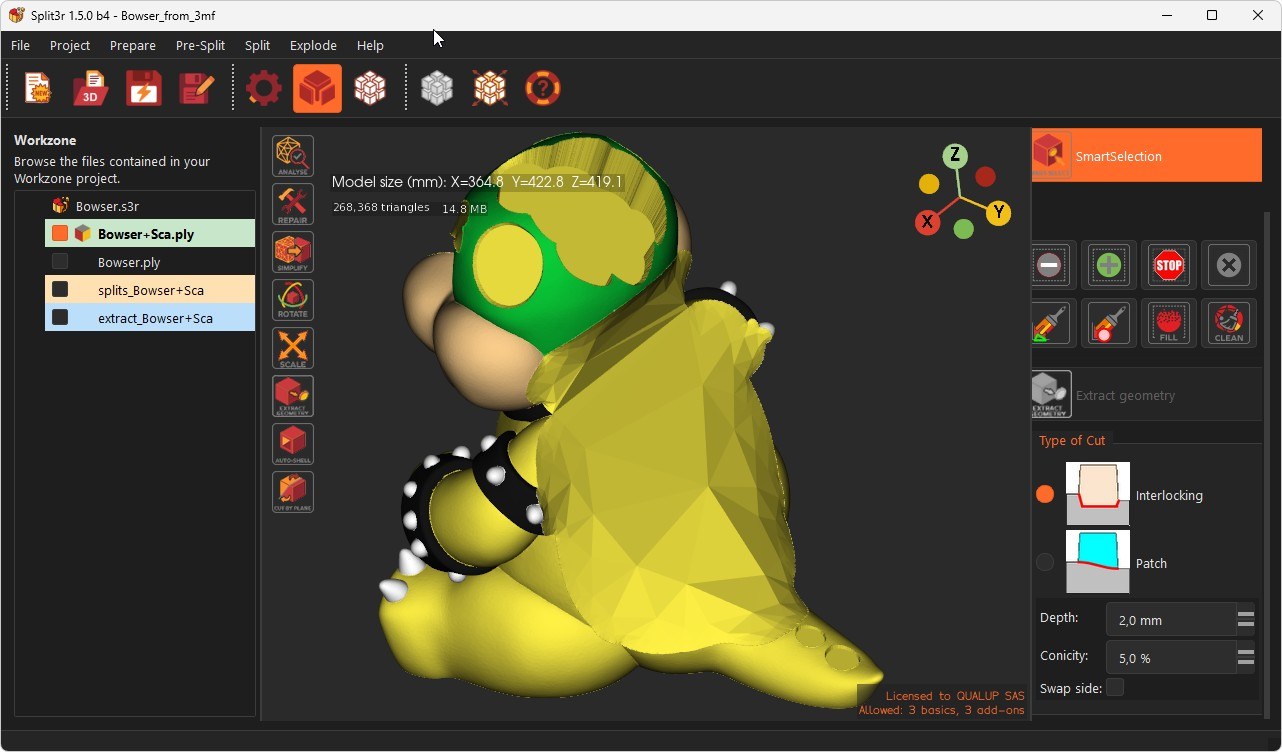
Technical and backup folders are hidden by default, so you only see the useful pieces.
Right-click anywhere in the tree > Show Hidden-Backup folders to reveal or hide them.
Automatic backups: every Extract and Cut keeps the original and the in-between versions safe, and your current piece always keeps a stable name.
Go back in time: show the hidden folders, right-click a backup > Restore as current body. Your current state is saved first, so it's safe to undo.
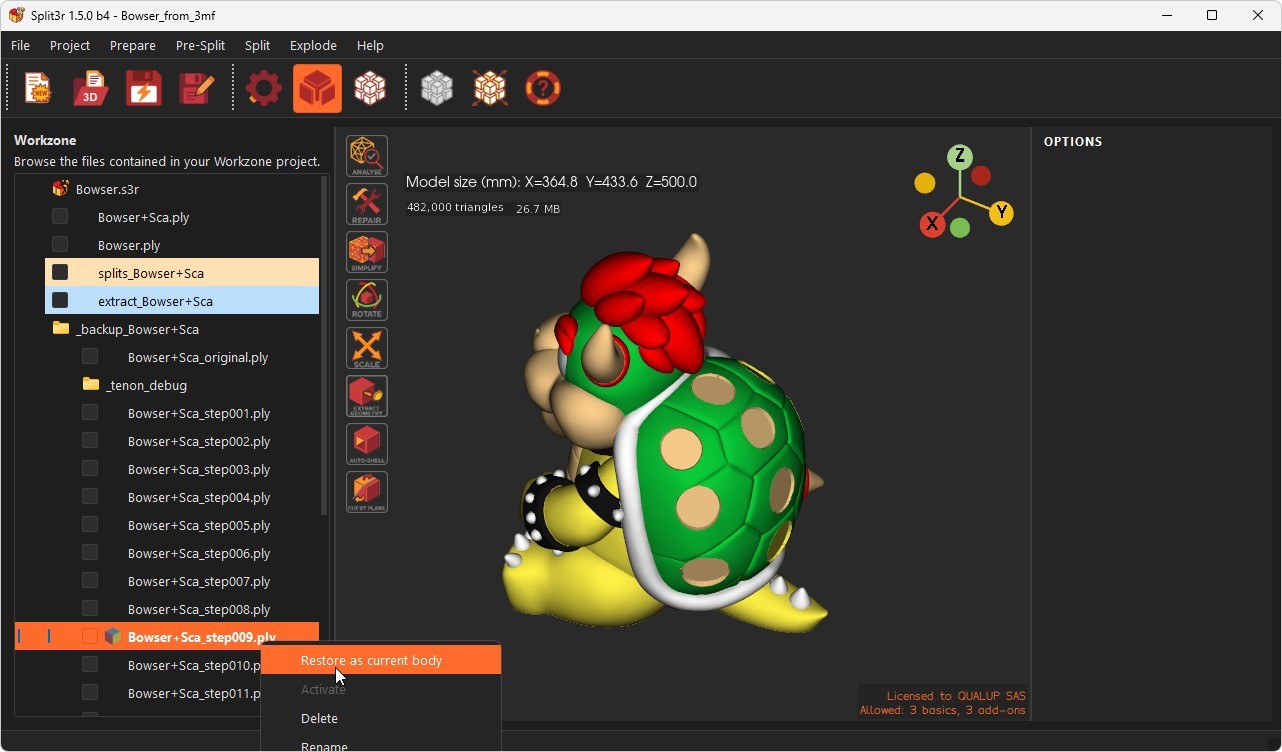
A more flexible Explode view
Explode any results folder you pick (Split, Extract, Cut, or Color-sorted), not just the latest one.
Folder checkboxes: show or make transparent all the pieces of a folder in one click.
Cleaner labels: Extract and Cut pieces show just their number in the 3D view.
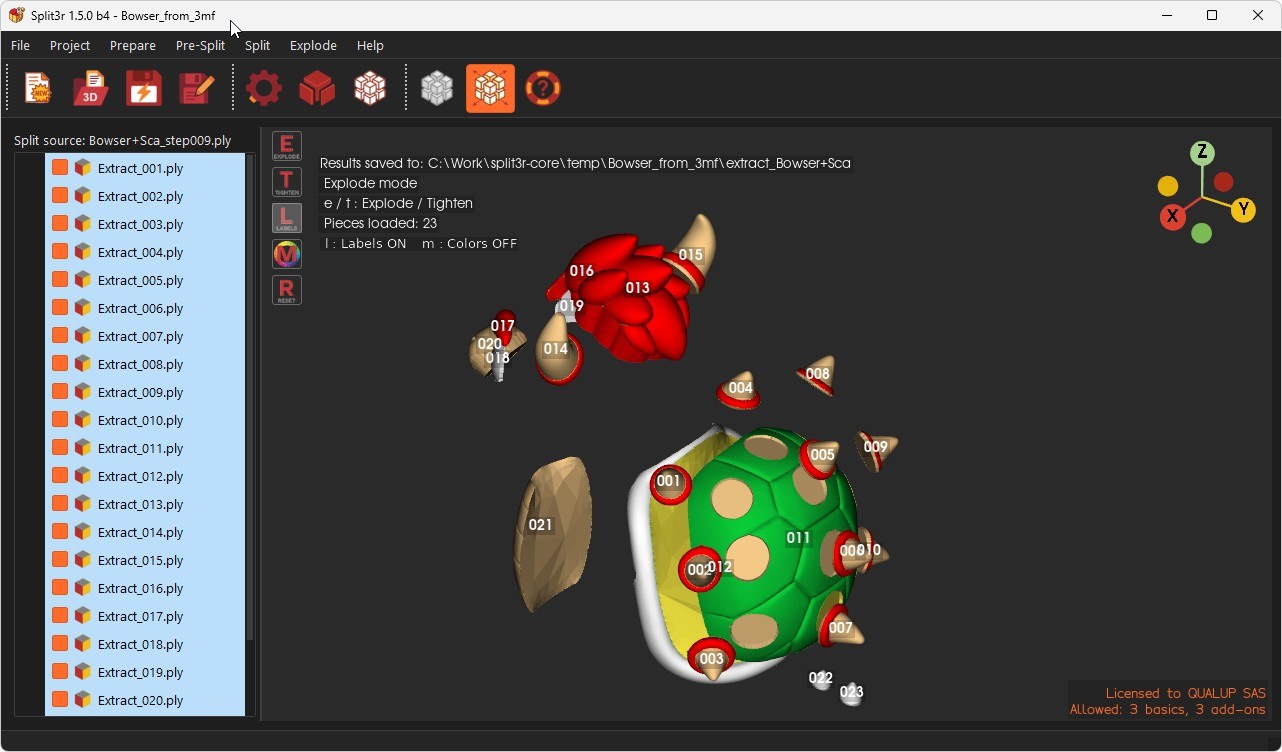
Automatically sort your model's parts by color
New option in the Analysis dialog: "Keep all bodies & sort by color."
On a colored model, each part is filed into a folder matching its main color, handy to organize before printing.
You just have to print all the files of the sub folder sorted by color.
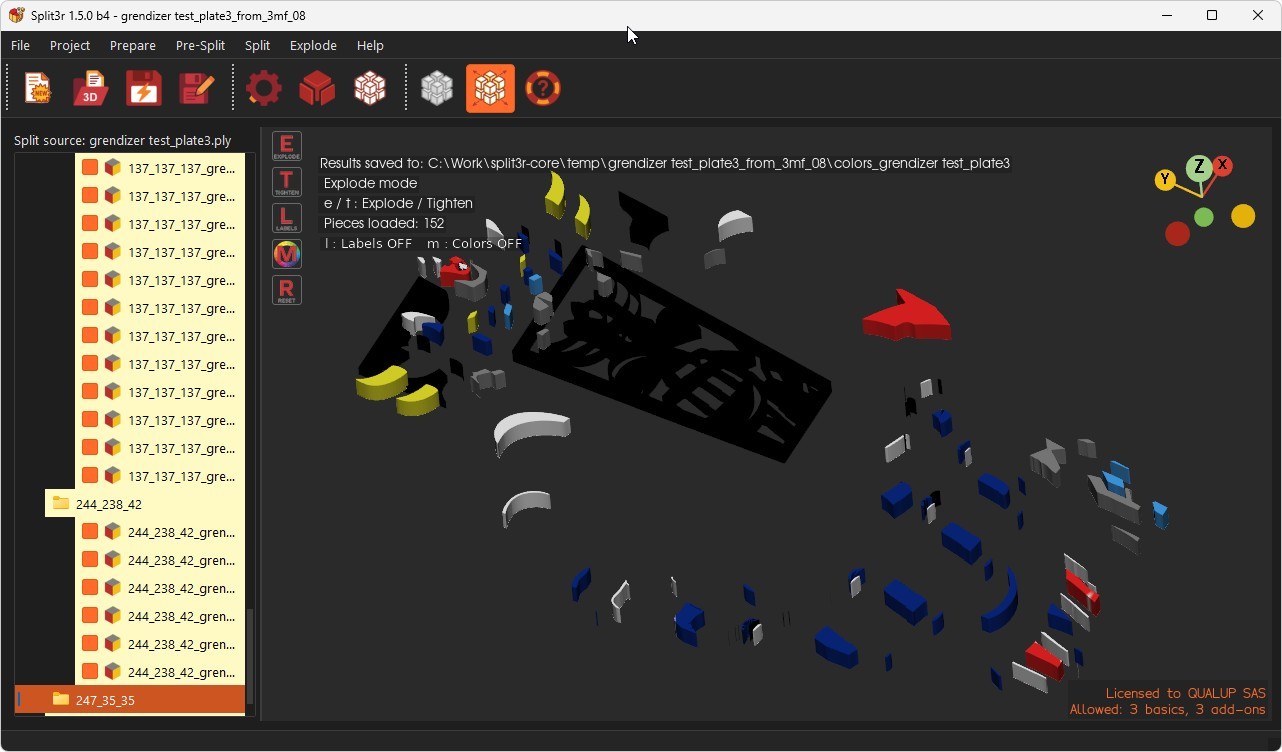
Smart Selection: paint by dragging
In Paint mode, hold CTRL (or Cmd key in mac ⌘) and drag to add faces continuously (hold ALT and drag to erase), just like the paint sphere.
No more clicking face by face.
Fixed a glitch where the part could start spinning on its own the first time you used the paint sphere.
File management
You can now delete the active file from the Workzone: it's removed from the 3D view and Split3r automatically switches to the nearest neighboring file.
Right-clicking anywhere in the Workzone tree (even empty space) opens the menu.
Other fixes
Fixed a crash that could happen when dragging and dropping a 3MF file onto the window.
Various stability improvements in the Extract and Explode workflows.
Split3r 1.5.0 b3
June 6, 2026 - Version 1.5.0 b3 is available for Windows
3MF Import: Painted colors now import cleanly (no jagged edges), and models keep their correct real-world size from Bambu Studio.
PLY Import: Open PLY files and create a Workzone directly.
More stable Selection & Extraction: No more crashes on unclean selections (Split3r guides you to Fill then Clean), more robust extraction on difficult or AI-generated meshes, and no crash when selecting too fast.
New controls: A Stop button to halt selection growth, a precise step-by-step minus (-) button (5% per click), a busy cursor during computation, and more detailed crash reports.
Before you buy Split3r
June 3, 2026 - Before You Buy: What to Expect from Split3r
Split3r is a young product. The first public version was released at the end of December 2025, and it is evolving fast.
We want you to buy it with your eyes open, so here is the honest truth about what it does and does not do.
Split3r depends entirely on the quality of the files you feed it
Auto-selection works by analyzing the geometry and topology of your mesh. If the mesh is dirty: non-manifold edges, holes, flipped normals, self-intersections, distorted geometry... The analysis will struggle, and your cuts or extractions can fail or crash.
That is why Split3r ships with a full set of tools
To Analyze, Simplify, and Repair files before you cut or extract, to Fill and Clean automatic selections before you extract.
These steps are not optional decoration : they are part of the workflow.
Skip them on a problematic file, and you should expect problems.
It is not magic. It is mathematics
There are billions of files on the web, plus an endless stream generated by AI, and we cannot test them all.
No algorithm on earth can correctly separate every possible shape on the first click.
These are genuinely innovative commands, and they have only existed since end of April 2026
It is simply unrealistic to expect them to flawlessly extract every part of every file in the world.
They won't, not yet, and possibly not ever for the worst inputs.
If you want a perfect, 100% stable product, please don't buy it right now. Wait.
We would rather you wait than be disappointed.
But if you understand that you are buying a fast-moving, innovative beta: and you're willing to run the repair tools and work with the software, then you will get value from it today, and it will keep getting better.
Thank you for your understanding, and for being part of Split3r's journey at this early stage.
Philippe (Split3r creator)
Split3r 1.5.0 b2
May 30, 2026 - Version 1.5.0 b2 is available for Windows
The macOS build will follow in the coming days.
The Linux build will come shortly after, in the following weeks.
We'll post an update here as soon as each one is ready.
This build brings the full set of features announced for 1.5.0
(see the posts below for details)
The new native cutting engine (7 x faster), full color support across the pipeline, colored 3MF export, and the updated Smart Selection / Extract tools, into a state we now consider stable enough for broad testing.
A word of caution: this isn't magic, it's just math. There are billions of files out there on the web and we obviously can't test them all.
We can't guarantee every feature will work on every kind of part, especially on files with degraded geometry (non-manifold edges, self-intersections, holes, flipped normals). If you run into one of these cases, a bug report with the problematic file is exactly what helps us make the engine more robust over time.
Workzone compatibility
Workzones are compatible across all Split3r versions, and 1.5.0 b2 installs next to your existing Split3r. If you hit an issue on the beta, just relaunch your previous version and reopen your project. Nothing is lost, so it's safe to test b2 on real work.
Known limitation
The new kernel doesn't yet support part marking. The automatic ID/label embedded on each piece during cutting is currently inactive. A fix is in progress, but for now, on large projects, you'll need to mark the pieces by hand at the end of the print to keep track of which one goes where during assembly.
What we need from you
Give the build a try on your usual workflow:
Try both monochrome and colored 3MF inputs.
Report anything that looks off, crashes, broken geometry, wrong colors, UI glitches, slow operations, confusing dialogs.
All issues must be submitted through the bug report system
Not by email or chat. The bug report includes the context, and file information we need to analyze each problem in detail.
Reports sent through other channels are much harder to investigate and will generally be redirected back to the bug report tool.
What's next
Once we've collected feedback on b2 and fixed whatever comes up, we'll move toward a final 1.5.0 release.
We're still aiming for a few weeks, depending on what the testing surfaces.
Thanks to everyone helping us shake this version out.
Split3r 1.5.0 - next beta
May 10, 2026 - Version 1.5.0. Coming Next Week for Beta Testers
Version 1.5.0 is almost ready. We expect to send it to beta testers next week.
While you wait, here are a few videos showing how the Smart Selection and Extract commands work. Both tools run equally well on monochrome files and on colored 3MF files, the workflow is exactly the same regardless of the source format.
Extracting multiple zones into a single piece
Smart Selection lets you pick several disconnected regions of a model and merge them into one extracted piece. Useful when the parts you care about aren't contiguous, but you still want them treated as a single unit downstream.
The selected zones don't have to be perfectly contiguous, small gaps, missing triangles, or narrow disconnections between regions are common, and that's where the Fill command comes in. Fill walks through the boundary of your selection and automatically bridges nearby zones together: it detects faces that sit close to the current selection but aren't included yet, and adds them so the final extraction comes out as one clean piece.
File “Bowser” courtesy of EON3D
Extracting complex zones
The same tools handle complex, irregular selections without trouble.
This video shows how Shift + click works for building up a selection.
Holding Shift while clicking adds new regions to the current selection without clearing what you already have.
File “Bowser” courtesy of EON3D
Split3r 1.5.0 - preview
April 29, 2026 - Split3r 1.5.0 - Preview
Blender doesn't handle 3MF color data easily, and a few sticking points kept slowing us down.
We've been working for months on a geometric cutting engine to replace Blender in Split3r.
Right after releasing 1.4.0 b0, the solution came overnight, all at once.
Split3r had already been refactored and was ready to plug the new engine in.
A few days later, version 1.5.0 was working.
The bottom line: you can now print a multi-color part larger than your build plate on any machine equipped with an AMS or another filament-changing system.
Split3r takes the colored 3MF in, splits it into printable pieces with their colors intact, and hands you back 3mf files your slicer can drive straight to the printer.
What's new
1. New native geometric splitting engine
Replaces Blender engine :
Splits are 7 to 8× faster than Blender
Split3r's surfacic pipeline processes cuts directly on the mesh surface, without volumetric reconstruction. On typical models, splits complete in seconds rather than minutes.
Handles complex open meshes
Non-manifold surfaces, open shells, thin walls, overlapping faces. Split3r doesn't require a perfectly watertight mesh to work. Whether your model came from a scan, a CAD export, or a sculpting tool, it splits cleanly without pre-repair.
Exact geometry, no approximations, no smoothing
The mathematical kernel uses constrained triangulation for all cut faces. Cap surfaces and joints are computed to exact coordinates, with no rounding, no smoothing filter, and no topology-altering post-process. The output is slicer-ready, watertight, and dimensionally accurate.
Preserves 3MF colors
Multicolor models exported from BambuStudio or Split3r itself retain their per-vertex color data through the entire split pipeline. Each piece comes out as a colored file, ready to re-import and print without manual repainting.
One-click export : all pieces ready for your slicer
A single command packages every split piece into individual 3MF files, compatible with BambuStudio, PrusaSlicer, OrcaSlicer and other major slicers. Open, place, and print : no conversion, no manual assembly, no extra steps.
Blender remains available as an option during beta test (whitout color handling).
2. 3MF color import (BambuStudio)
[Add-on license]
Filament colors are converted to per-vertex RGB colors in the exported PLY files. These colors are fully preserved throughout the splitting process: every piece produced by Split3r keeps the exact colors of the corresponding region of the original model, ready to be printed on a multi-color machine.
File “Bowser” courtesy of EON3D
3. Dominant color on cut faces
Cut faces and tenons now take the dominant RGB color of the part instead of a neutral gray, reducing filament swaps when printing.
4. AutoShell on colored parts
[Add-on license]
The hollow shell combines an outer envelope (colors preserved) with an inner shell at the configured wall thickness (dominant color). Output is PLY when the source is colored, STL otherwise. The result can be re-split normally in Split3r, keeping the colors.
File “Bowser” courtesy of EON3D
5. Smart Selection / Extract on colored 3MF
[Add-on license]
Both tools now work directly on colored 3MF files. You can isolate in some clicks and extract a region of a multi-color model without losing any of its color information along the way.
File “Bowser” courtesy of EON3D
6. Export WorkZone to colored 3MF
[Add-on license]
A new File menu entry converts every PLY and STL in the active workzone to 3MF in a single operation. The full folder structure is mirrored under a new export_3mf/ subfolder.
Conversion rules:
Colored PLY → 3MF with per-vertex RGB colors (3MF Materials & Properties extension). Colors are exported as a deduplicated palette, producing compact files compatible with BambuStudio and other 3MF-aware slicers.
Uncolored PLY → standard 3MF (geometry only).
STL → standard 3MF, renamed <filename>_STL.3mf to avoid name clashes with PLY exports sharing the same stem.
A progress dialog is shown during the export, and errors on individual files are reported at the end without interrupting the rest of the batch.
Everything else still works the way you'd expect
All the other Split3r features behave as before.
STL workflows are untouched, and every tool that already supported PLY now transparently handles colored PLY too, you don't have to think about which format you're working with.
Drop in an STL, a plain PLY, or a colored 3MF, and Split3r picks the right path automatically.
The whole point of this release is that color support has become a first-class citizen everywhere it makes sense, without breaking anything that was already working.
Help us test this release
This version is in testing and will be released as soon as it's fully stabilized, we're hoping within a few weeks.
If you'd like to help us test it, send an email to support@split3r.com.
We will register the first 10 Windows requests and the first 5 Mac requests, no further spots will be available after that.
To take part, you just need:
a full Split3r license (Kickstarter backer or purchased)
some time to spend testing the version
and ideally, willingness to file bug reports when you run into issues
Split3r 1.4.0 b0
April 24, 2026 - Split3r 1.4.0 b0 is here
We're excited to release Split3r 1.4.0 b0, a major milestone for the project. This release delivers the full version of our two flagship features and expands Split3r to a new platform.
New customers can also install version 1.4.0 beta alongside the existing 1.3.1 release, both versions run independently, so you can try the beta without affecting your stable setup.
All existing commands from version 1.3.1 remain unchanged and just as stable as before, this beta only adds new features on top of the proven 1.3.1 core.
All customers and Kickstarter backers can download version 1.4.0 beta here: https://www.split3r.com/download-and-patches.html
What's new
macOS support
(Apple Silicon M1 to M4): Split3r now runs natively on Apple Silicon Macs, alongside the existing Windows and Linux versions.
SmartSelection / Extract
[Add-on license] : The complete workflow is now available, from smart face-based selection to extraction with Patch or Interlocking closure.
Simplify STL
[Add-on license]: Reduce triangle count on heavy STL files with a simple slider, from 25% up to 99%.
All Kickstarter stretch goals unlocked
We're thrilled to announce that every single stretch goal from our Kickstarter campaign has been delivered. A huge thank you to all our backers, your support made this possible. Split3r keeps growing thanks to you.
Extract is complete · Split3r 1.4.0 is coming
April 19, 2026 - Extract Command Complete + Version 1.4.0 - b0 Coming Soon
The extract command is now fully implemented, featuring Dynamic Interlocking Management, automatically handling interlocking structures of any complexity.
Combined with SmartSelection, this brings a complex CAD process down to a single, seamless operation, a one-of-a-kind workflow.
Demonstration videos below.
On another front, version 1.4.0 b0 is almost ready.
We are currently finishing the testing phase across all three supported platforms: Windows 10/11, Linux, and macOS.
The release will follow once the tests are cleared.
Stay tuned.
SmartSelect / Extract in Split3r 1.4.0
April 13, 2026 - SmartSelect / Extract : Coming in Split3r 1.4.0
Ever wanted to isolate just one part of your 3D model, without CAD, without Blender, without manual mesh surgery, without losing your mind?
Split3r 1.4.0 introduces SmartSelect / Extract, and we think it's the simplest way to cut a clean piece out of any STL file, period.
Just CTRL+Click on the area you want. Split3r's SmartSelection engine automatically detects the region, respects the surface topology, and highlights exactly the right faces
Even on complex organic shapes. Grow or shrink the selection with "+" and "-". Happy with it? Hit Extract and you're done.
Split3r handles everything under the hood: the cap surface, the boolean, your extracted piece comes out clean, closed, and ready to slice.
No scripting. No plugins. No 45-minute tutorials. Just click and extract.
Available in a few weeks on Windows 10/11, macOS and Linux as part of the Full version (Basic + Add-on), and of course, free for all backers and existing Full version owners.
Split3r on macOS: the final steps
April 1, 2026 - macOS Beta... Closer Than Ever.
Since the first beta delivery to our KickStarter backers in October 2025, Split3r has grown significantly, through versions 1.0.2, 1.1.0, 1.2.0, and now 1.3.1, bringing major new features, deep file analysis tools, Linux support, and continuous stability improvements. Throughout this time, one question kept coming back from our users: when is macOS coming?
For the past several weeks, we've been candid with our users about why macOS was taking longer than expected.
The challenges were real: Apple's deprecation of OpenGL in favor of Metal, the sensitivity of the Qt6 + VTK integration to macOS-specific initialization, Retina/HiDPI scaling complexity, and differences in window and event handling, all compounding each other.
We're happy to report that the hardest of these problems are now solved.
The 3D viewport is running stably, interactions are consistent, and the rendering pipeline is behaving as expected.
What's left is the work that comes before any responsible public release: deep testing across hardware configurations, setting up the macOS build, packaging and Apple security approval, and finishing a few Windows-specific items, primarily merging the CHM documentation into a unified HTML format.
The macOS beta is not out yet, but it's no longer a question of weeks.
The initial beta will target macOS Apple Silicon (M1 and later). Intel Mac support is not ruled out but is not the current priority, we want to get a solid, well-tested release out first.
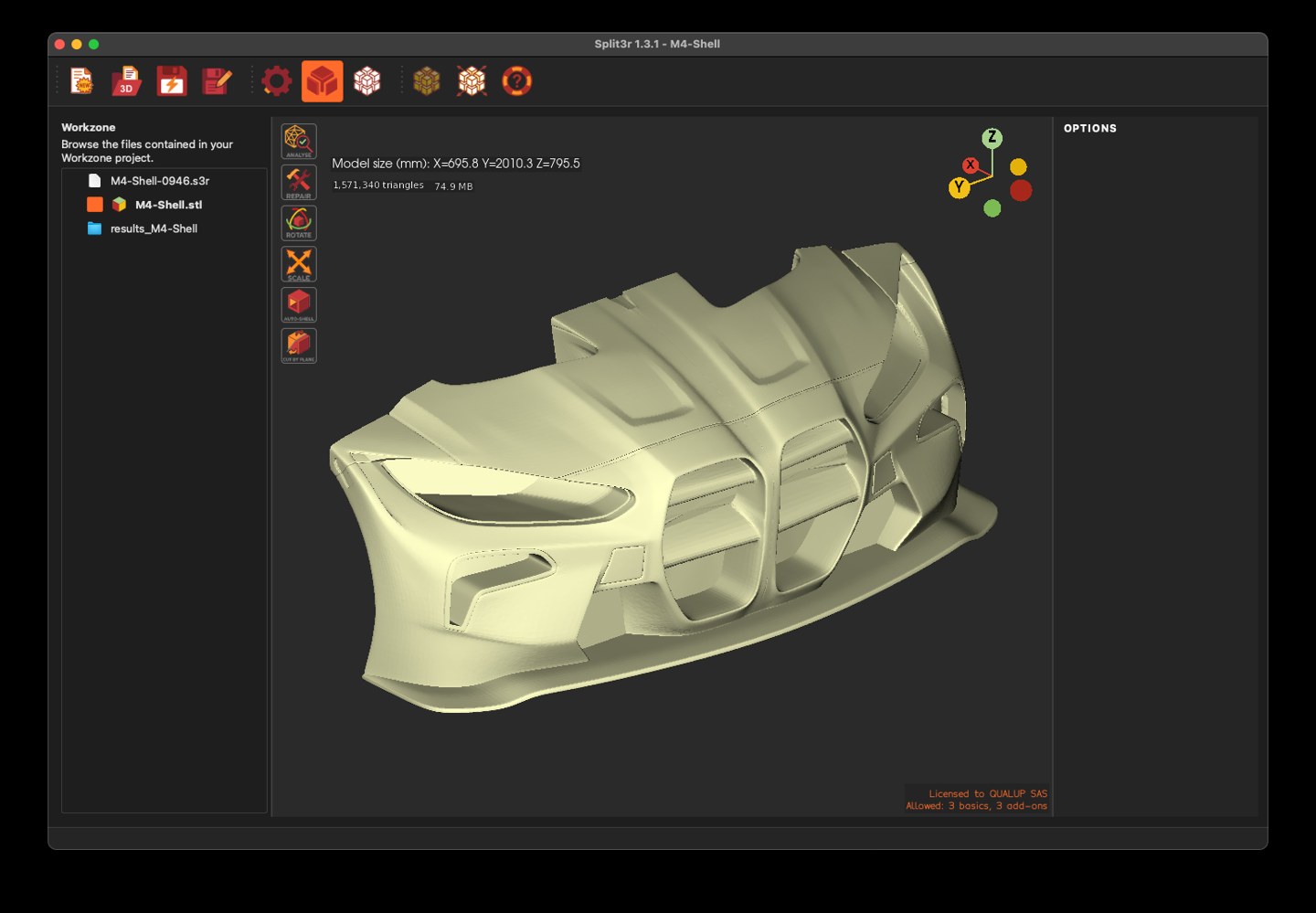
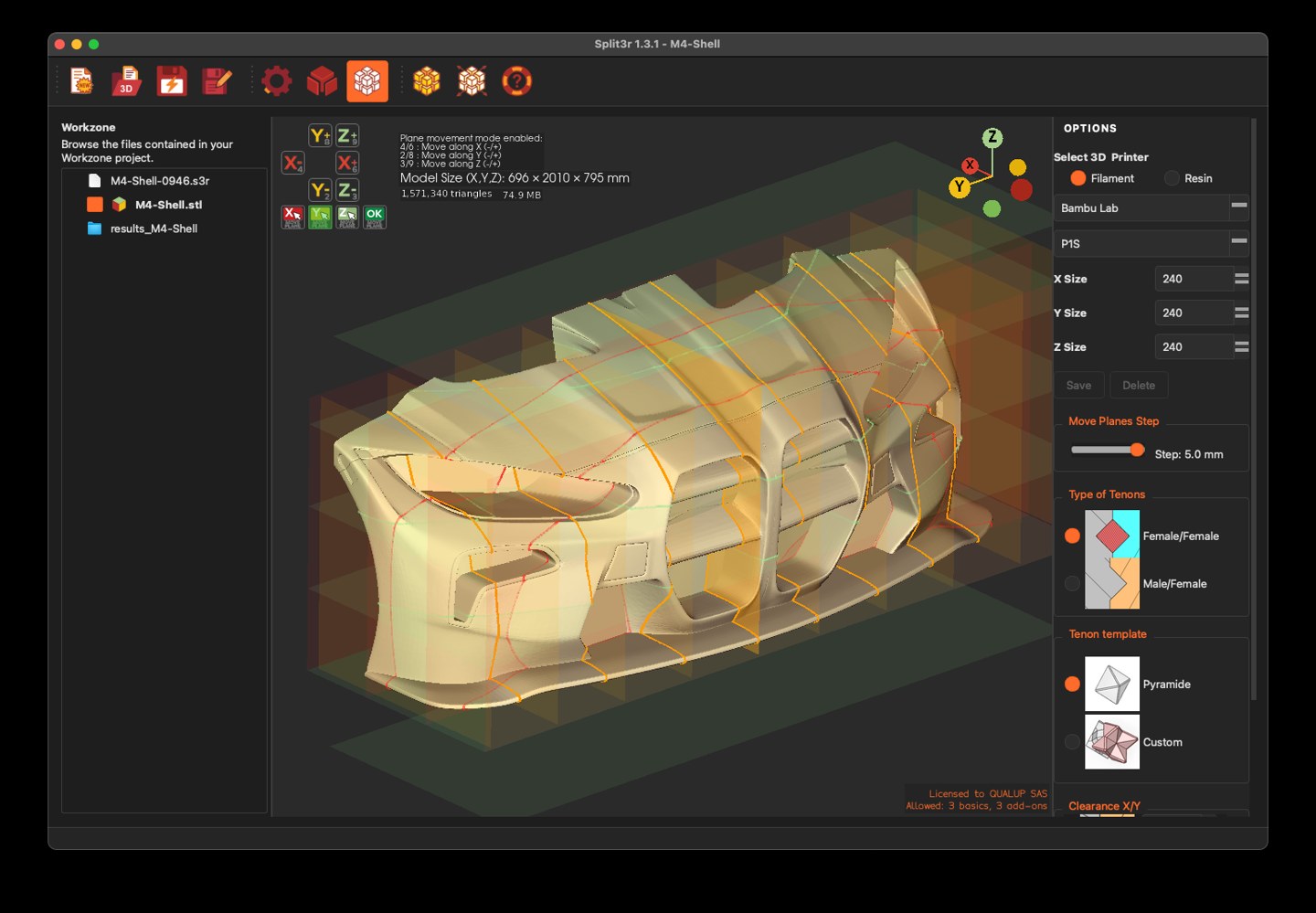
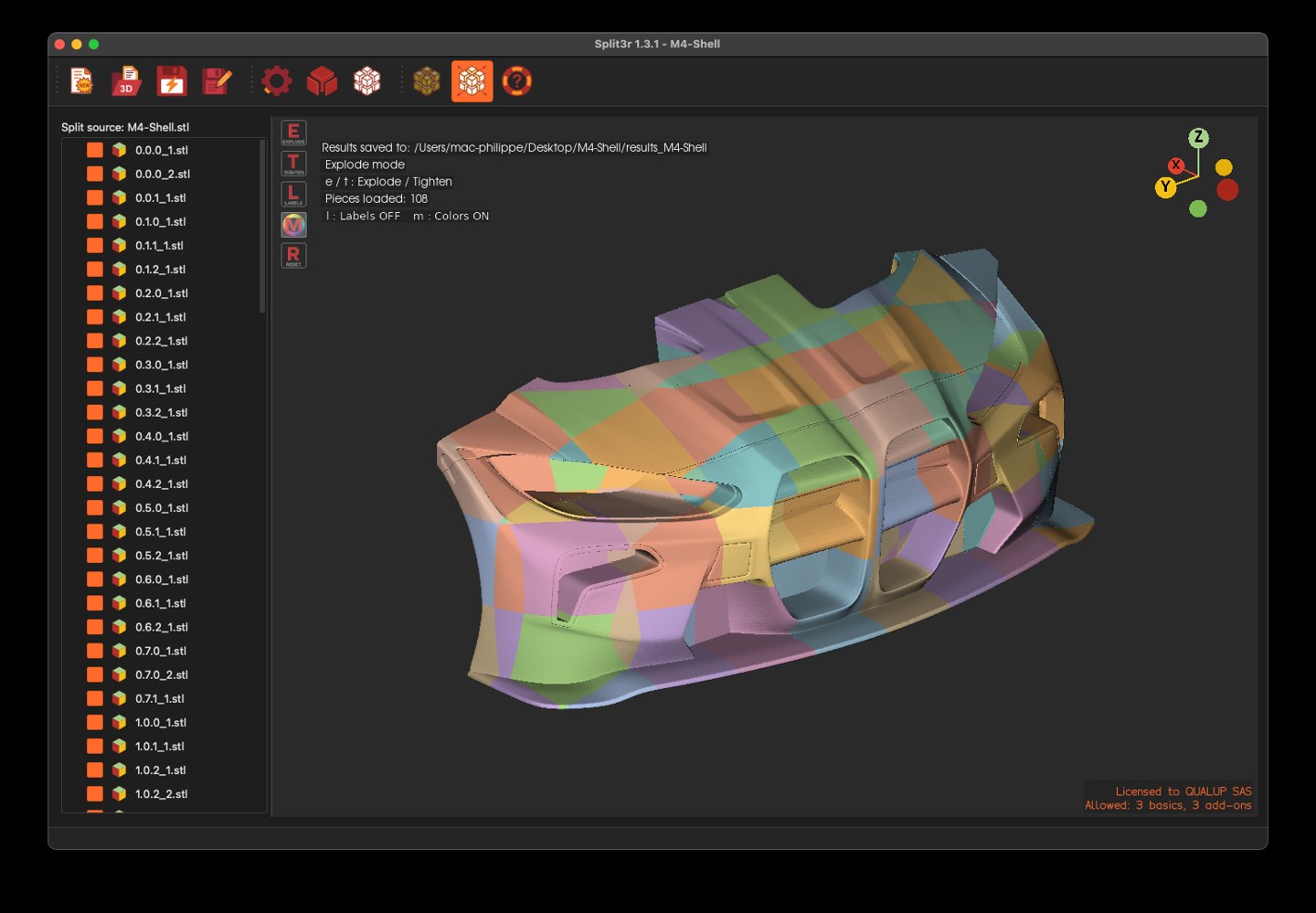
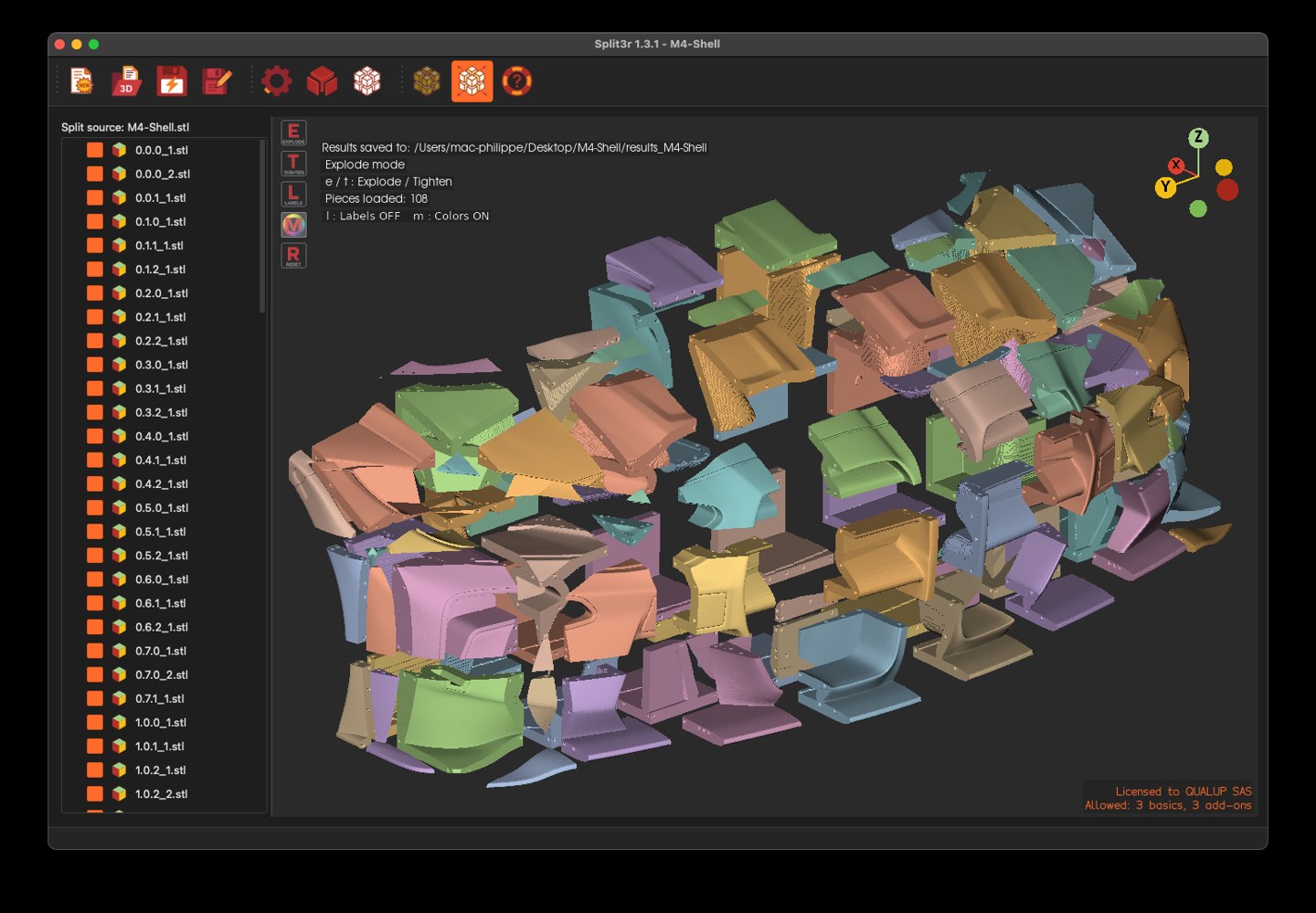
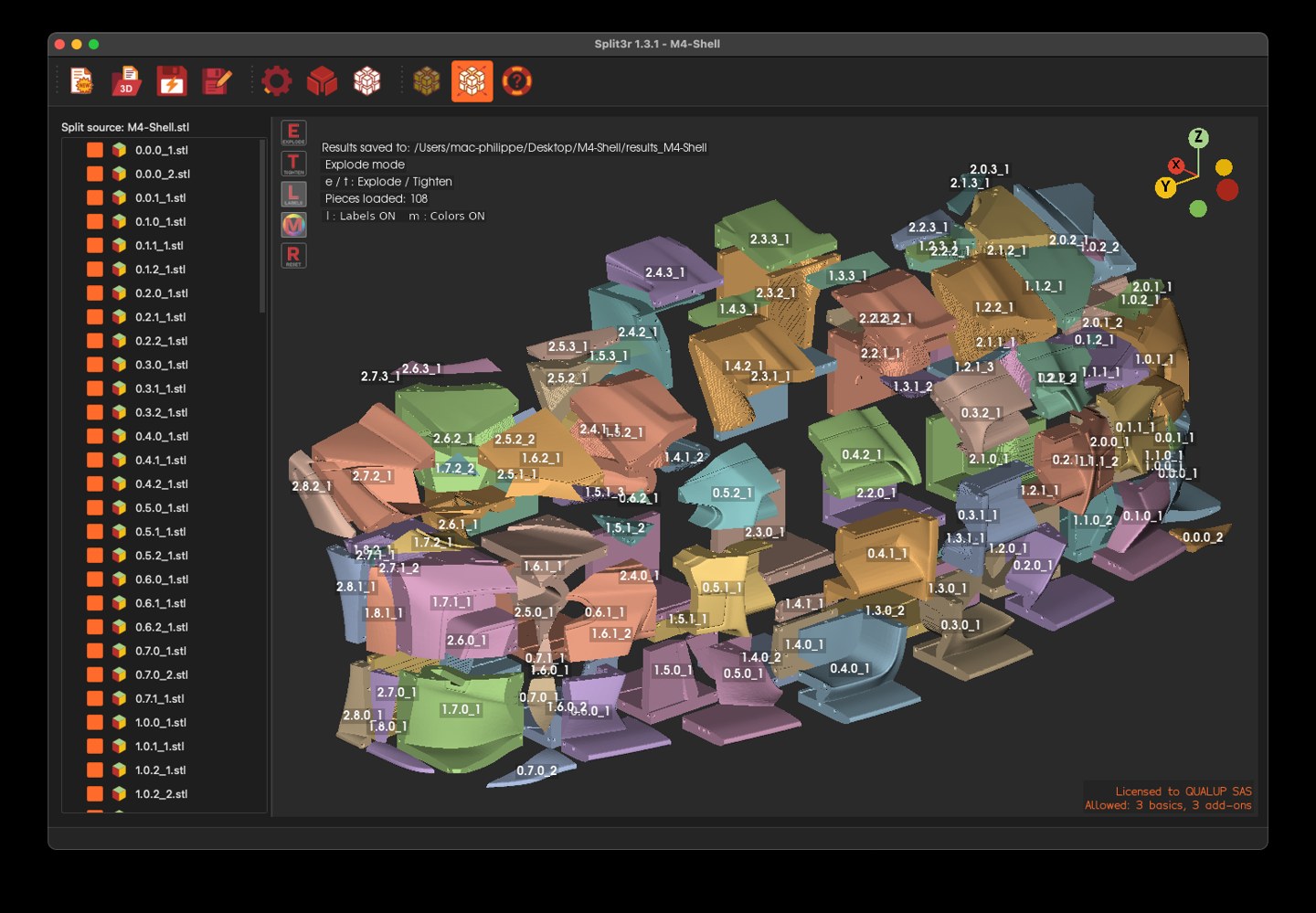
As you can see in the pictures above, Split3r is already running on macOS with a real project, and it's looking good.
If you've been waiting for the macOS version, thank you.
Your patience and support throughout this process means a lot, and we're genuinely excited to finally get this in your hands very soon.
Split3r 1.3.1
March 10, 2026 - Split3r 1.3.1 is available for download.
Split3r 1.3.1 is now available on the download page.
Discover all the new improvements and features in Split3r 1.3.1 on the What’s New dedicated page.
This is a minor update, only 3 new features and several bugs fixed...
Split3r 1.3.0
February 21 , 2026 - Split3r 1.3.0 is available for download.
Split3r 1.3.0 is now available on the download page.
Discover all the new improvements and features in Split3r 1.3.0 on the What’s New dedicated page.
This is a major update, bringing significant improvements, particularly in file analysis and repair tools. This version has been extensively tested on all the problematic files in our internal collection to ensure greater robustness, stability, and reliability in real-world scenarios.
The Getting Started guide has been fully updated as well, allowing you to quickly explore and understand all the new features and enhancements.
At this stage, there are no known bugs, aside from a few minor translation issues that will be progressively refined.
Because this release introduces many new features and important internal changes, your feedback is extremely valuable. If you encounter any issue, please don’t hesitate to contact support.
Split3r 1.2.0 RC
January 28 , 2026 - Split3r 1.2.0 RC is available for download.
This Version is available for download at this page by all customers (KickStarter and Purchaser).
This version installs alongside your current version and uses your current login credentials
(you can keep your existing versions).
Full details are available this page : What’s New – 1.2.0 RC
This version includes only completed and validated features and fixes and is provided as a Release Candidate prior to the final 1.2.0 stable release.
Some Feature of KickStarter Stretch Goals are still in Beta (Cut by plane...)
Users are invited to report any remaining issues before the final release. Thank you for your help.
Unfortunately, the macOS version is still not ready.
We are currently experiencing issues with certain graphical and mathematical libraries, which behave differently on macOS than on Windows and Linux.
These differences require additional investigation and adjustments before a macOS release can be provided.
Split3r 1.2.0 beta for Linux
January 28 , 2026 - Split3r 1.2.0 Beta will be available for Linux
Split3r 1.2.0 Beta For Linux is available for download at this page
This is the first Linux release of Split3r.
At this stage, it has been tested only on Fedora and Ubuntu.
The Linux version includes all features available in Split3r 1.2.0 for Windows, with one exception:
one Repair function relies on Windows-specific components and is therefore not available on Linux.
As this is an initial Linux release, we kindly ask for your understanding and feedback.
Please do not hesitate to contact us if you encounter any issues or unexpected behavior.
Selections can be saved and reloaded (Ctrl+S / Ctrl+L).
Selections can be saved and reloaded (Ctrl+S / Ctrl+L).