
Fit Issues
1. Check whether the issue comes from printing
If most parts of your model fit together correctly but one or two are too tight, don't immediately reprint the entire model.
Start by checking only one of the affected parts. Small dimensional variations during printing can be enough to prevent two parts from fitting together correctly.
2. Check the print orientation
The orientation of a part on the build plate can affect its dimensional accuracy. The same geometry may have slightly different dimensions depending on the orientation in which it is printed.
If two parts that should fit together have different dimensions after printing, check their print orientation before assuming there is an issue with the split.
3. Check calibration and excess material
A printer that is not properly calibrated on the X, Y or Z axes can produce small dimensional inaccuracies.
Also check the corners and outer surfaces of the part. High print speeds, over-extrusion or small blobs around corners can locally increase the dimensions and prevent the parts from fitting together.
4. Test XY compensation
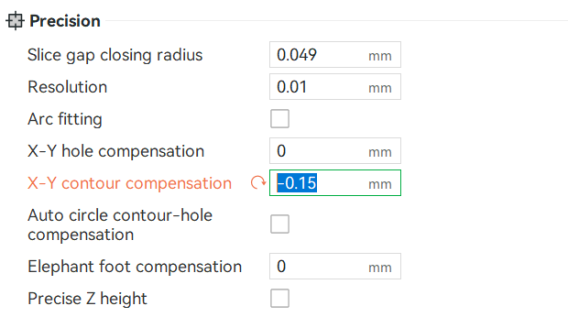
If a part needs to fit inside another part but is slightly too large, try reprinting only that part with a small negative XY compensation.
Start with -0.10 mm. If the fit is still too tight, try -0.15 mm.
These values are only starting points. The optimal setting depends on your printer, material, slicer and print profile.
5. Reprint only one part
Don't immediately restart the entire print. First, reprint only one of the problematic parts with the new setting and test the fit.
If the new part fits correctly, the issue was most likely related to printing tolerances rather than the geometry of the split.
This method helps you quickly identify the cause of the problem while avoiding wasted time and filament.
Key takeaway
If 18 parts fit correctly but 2 don't, first test one of the affected parts with -0.10 mm XY compensation, then -0.15 mm if necessary, before reprinting the complete model.