
Set-up in 6 steps
Before you start: a Full License, and Bambu Studio or OrcaSlicer installed on the computer.
1. Prepare the print profile. In Bambu Studio or OrcaSlicer, set the printer, the filament and all the print settings of your jobs, for example on a simple cube, then save the project as a .3mf file. These settings are applied to every piece.
2. Prepare the split file. In Split3r, on any model, set the split the way you want it done: the same printer as in the .3mf, the piece size, the type of joint, Optimize or not. Save the project with File, Save As: the .s3r file you get is your reference file.
3. Create the job folder. A folder where you put that .s3r file, and only one. The .3mf profile can sit there too.
4. Set up Automatic Slicing. Menu Project, Automatic Slicing Configuration...: give the job folder; in the Slicing tab, tick "Slice the pieces after the split" and choose the .3mf profile; in the Pricing tab, your rates if you want the priced quote.
5. Drop your models (STL, PLY or 3MF) in the job folder, next to the .s3r.
6. Start. Menu Project, "Automatic Slicing: Process Job Folder Now". Or tick "Automatic Slicing: Watch Job Folder" so that every new model is processed on its own. Or start Split3r with --batch from another program.
Result: every model gets its own sub-folder (its Workzone), with the split pieces, the pieces laid in their print position, the G-codes, the pictures, the PDF quote and the data file. The chapters below give the details.
About ready.txt: with models dropped in the job folder as above, you have nothing to create: Split3r writes this file itself in each Workzone it prepares. You only need it when you build the Workzone sub-folders yourself (chapter 3): put a ready.txt file, empty or not, in the sub-folder, last. It tells Split3r that the Workzone is complete and can be processed.
Reference guide
This guide describes the Automatic Slicing mode of Split3r (first called Quotation mode): a batch mode that splits models from a job folder, lays every piece in its print position, optionally slices them with your own slicer, and writes machine-readable results (JSON), pictures and PDF reports. It is now a standard function of Split3r: the three menu entries are always there, the -q flag is no longer needed (it is still accepted and changes nothing). It requires a Full License (Basic + Add-ons): without it the entries are greyed out and --batch ends with exit code 3. The --batch flag and the file names (quotation_result.json...) have not changed.
Split3r 1.5.0 RC2 is available on the Downloads page.
- 1. Starting Split3r in batch mode
- 2. Configuration
- 3. Job folder and Workzones
- 4. Automatic Workzones (models dropped at the root)
- 5. Piece sizes and cut planes
- 6. Print positions
- 7. Slicing
- 8. Files written per Workzone
- 9. quotation_result.json
- 10. What stops a Workzone, and what does not
- 11. Usable plate size (custom printer)
- 12. Logs
- 13. Current limits of this beta
1. Starting Split3r in batch mode
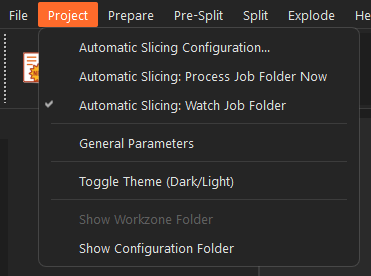
From the window: menu Project, the three "Automatic Slicing" entries. From the command line, with --batch (the window stays visible):
macOS:
/Applications/Split3r.app/Contents/MacOS/Split3r --batch /path/to/JobFolder/Applications/Split3r.app/Contents/MacOS/Split3r --batch /path/to/JobFolder/Workzone/project.s3r
Linux (AppImage, the file is named Split3r-<version>-x86_64.AppImage):
./Split3r-1.5.0-x86_64.AppImage --batch /path/to/JobFolder
Windows (the installer puts Split3r in C:\Program Files\Split3r_<version>):
"C:\Program Files\Split3r_<version>\Split3r.exe" --batch D:\Jobs
Command-line flags
| Flag | Effect |
|---|---|
| (none) | The Project menu starts with three entries: Automatic Slicing Configuration..., Automatic Slicing: Process Job Folder Now, Automatic Slicing: Watch Job Folder. Nothing runs until you use them. If the watch was left on, it resumes at the next start. |
--batch <job folder> | Processes every ready Workzone of the folder, then closes Split3r. |
--batch <file.s3r> | Processes that single Workzone, even if it already has a result, then closes. No batch file is written in that case. |
-d | Writes a detailed log file (see section 12). Can be combined with the flags above. |
Exit code of --batch: 0 every Workzone succeeded, 1 at least one failed, 2 nothing was processed (folder not found, no ready Workzone), 3 the licence does not include this function (a Full License is required). Any other value means Split3r itself crashed.
Run one batch at a time. A licence allows one active computer, and two runs on the same job folder would pick up the same Workzones.
Licence: each run needs the licence server. In this build, if the server cannot be reached at start-up, a licence window opens and waits for a click, which blocks an unattended run. During a long run the licence is checked again when the last check is more than 15 minutes old.
2. Configuration
Menu Project, "Automatic Slicing Configuration...". The settings are saved in quotation.json next to the other Split3r settings:
Settings folder
| System | Folder |
|---|---|
| macOS | ~/Library/Application Support/split3r/ |
| Linux | ~/.config/split3r/ |
| Windows | %APPDATA%\split3r\ |
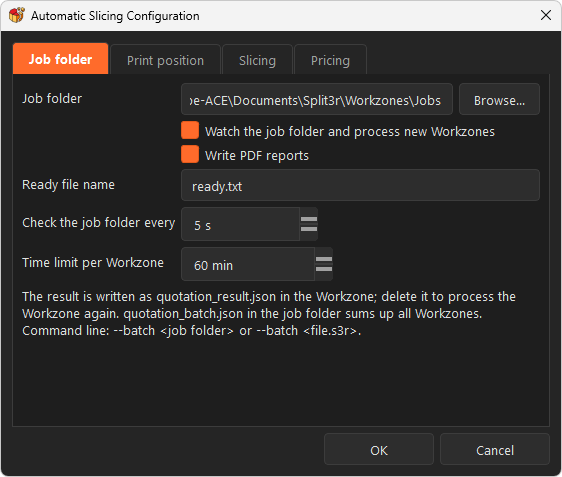
Job folder tab
| Setting | Default | Meaning |
|---|---|---|
| Job folder | empty | The folder that contains the Workzones (and the models for the automatic mode, section 4). |
| Watch the job folder and process new Workzones | off | Checks the folder at regular intervals while Split3r is open (period below). |
| Ready file name | ready.txt | A Workzone is taken only when this file is present. Write it last. |
| Check the job folder every | 5 s | Watch period. |
| Time limit per Workzone | 60 min | Beyond it the Workzone is reported as failed with the reason. |
| Write PDF reports | on | quotation_report.pdf per Workzone, quotation_batch.pdf per job. |
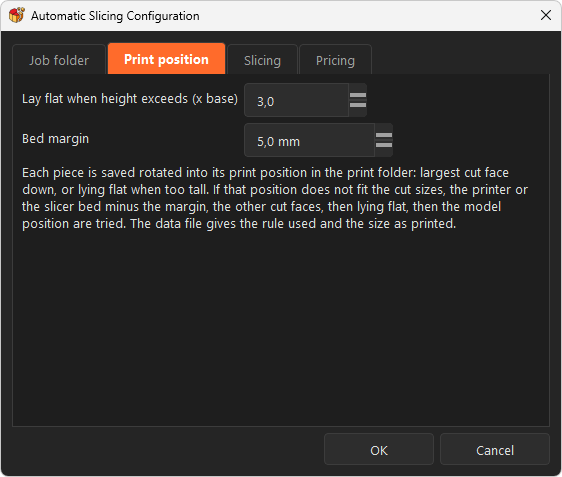
Print position tab
| Setting | Default | Meaning |
|---|---|---|
| Lay flat when height exceeds (x base) | 3.0 | A piece standing on a cut face is "too tall" when its height exceeds this ratio times the smaller side of its base (section 6). |
| Bed margin | 5 mm | Taken off the printer size on each side in X and Y, and once in height, for the whole batch: the largest piece sizes allowed (section 5), the check that a printed piece fits, and the tenon plates. If your printer entry already holds your own margins, lower this setting, but keep 1 or 2 mm: a piece exactly as tall as the printer is refused by the slicer (section 7). |
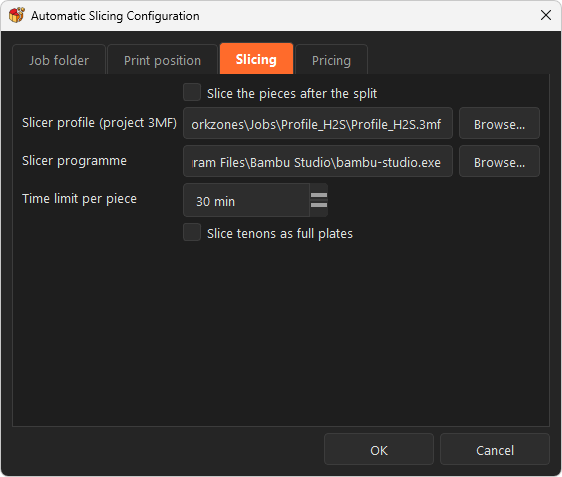
Slicing tab
| Setting | Default | Meaning |
|---|---|---|
| Slice the pieces after the split | off | Sends every piece and the tenon to the slicer, one at a time. |
| Slicer profile (project 3MF) | empty | A project saved from Bambu Studio or OrcaSlicer ("Save project"): printer, process and filament, including supports, filament density and price. All its settings are applied to every piece. |
| Slicer programme | empty | Empty = the slicer found on this computer for the profile. Fill it in to use another program. |
| Time limit per piece | 15 min | Beyond it the slicer is stopped and the piece is reported as not sliced. |
| Slice tenons as full plates | off | Off: one tenon is sliced and multiplied by the quantity. On: the tenons are laid side by side, 5 mm apart, on as many plates as needed, one G-code per plate. |
These settings are used only to fill the pricing block and the PDF.
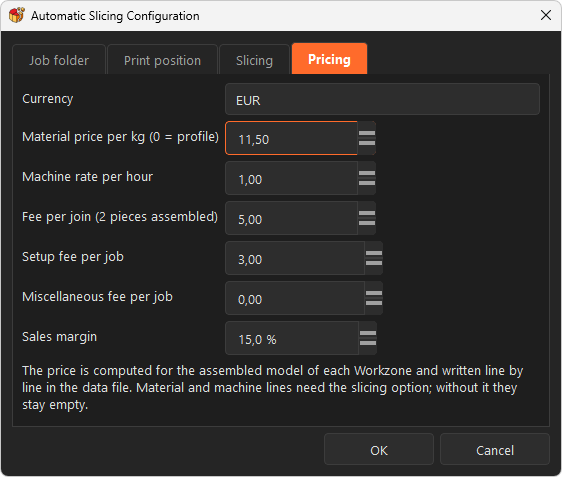
Pricing tab
| Setting | Default |
|---|---|
| Currency | EUR |
| Material price per kg (0 = profile) | 0 = take the filament price of the profile |
| Machine rate per hour | 1.0 |
| Fee per join (2 pieces assembled) | 5.0 |
| Setup fee per job, Miscellaneous fee per job | 0 |
| Sales margin | 0 % |
3. Job folder and Workzones
A job folder contains one sub-folder per Workzone. A Workzone contains:
- exactly one
.s3rproject file, - the model it names (
stl_path), STL, PLY or 3MF, - the ready file (
ready.txtby default), written last.
A Workzone that already contains quotation_result.json is considered done and is skipped. Delete that file to process it again. Folders whose name starts with . or _ are ignored.
Minimal .s3r (JSON):
{ "stl_path": "column.stl", "x_size": 310, "y_size": 290, "z_size": 340, "printer_brand": "Bambu Lab", "printer_model": "H2S usable", "printer_size": [310, 290, 340], "tenon_mode": "lap_joint", "lap_joint": {"d1": 1.0, "width": 2.0, "height": 2.0, "clearance": 0.15}, "tenon_template": {"template": "pyramide", "pyr_base": 10.0}, "optimize": {"enabled": true, "centered": false, "swap": false}, "equal_pieces": true, "split3r_version": "1.5.0", "client": {"quote_id": "Q-2026-0912", "file_id": 4711, "scale": 1.0}}
Keys of the .s3r file
| Key | Meaning |
|---|---|
stl_path | Model file name, relative to the Workzone. |
x_size, y_size, z_size | Largest size of a FINISHED piece in mm, lip or male tenon included (section 5). May be smaller than the printer: that is your own margin. |
printer_brand, printer_model, printer_size | Printer as listed in Split3r, or a custom printer (section 11). |
tenon_mode | none, lap_joint, male_female, female_female. |
tenon_template | template (pyramide or custom), pyr_base in mm, custom_path for a custom tenon file. |
lap_joint | d1, width, height (the lip height), clearance (only for lap_joint). |
optimize | enabled, centered, swap: the Optimize cut boxes of the PreSplit. Without optimize, the regular grid is used. |
equal_pieces | true: pieces of the same size in each direction (section 5). Absent or false: full-size pieces, the remainder in the last one. |
client | Free block. Split3r never reads it; it is kept in the .s3r and copied as is into quotation_result.json. |
Do not write planes or printer_index: Split3r recomputes the cut planes from the sizes. The model must already be at the final scale (no scale key is read).
4. Automatic Workzones (models dropped at the root)
You can also drop model files (STL, PLY, 3MF) directly in the job folder, next to exactly one reference .s3r. At the next pass (watch, "Process Job Folder Now" or --batch), each model gets its own Workzone: a sub-folder named after the file (suffix _2, _3 if the name is taken), the model moved into it, a copy of the reference .s3r with stl_path set to the file and the cut planes removed, and the ready file. Then the Workzone is processed like any other.
Rules:
- one
.s3rat the root; none or several: nothing is prepared and the log says why; - the slicer profile 3MF configured in the settings is never taken as a model, even if it sits in the job folder;
- a model is taken only when its size and date have not changed between two passes (a file still being copied waits for the next pass);
- other files at the root are ignored.
5. Piece sizes and cut planes
x_size, y_size and z_size are the largest size of a finished piece, whatever protrudes from its cut face included. Split3r does the arithmetic:
1. In batch mode, a size above "printer size minus bed margin" (margin on each side in X and Y, once in height) is reduced to that value before the split. settings.cut_size_capped then gives the values before and after; settings.cut_size_mm always holds the sizes really used.
2. The distance between two cut planes is that size minus what protrudes: the lip height in lap joint mode, the male tenon height (half its base) in male/female mode, nothing otherwise. settings.protrusion_mm and settings.cut_step_max_mm give the values.
Example: printer 310 x 290 x 340, bed margin 5, lap joint lip 2: finished piece at most 300 x 280 x 335, cut planes at most 298 x 278 x 333 apart.
equal_pieces: without it, pieces are cut at the full distance from one end and the remainder goes into the last piece (a 1000 mm model at 333 mm gives 333 / 333 / 333 and a 1 mm sliver). With it, Split3r keeps the smallest number of pieces that respects the sizes and gives them all the same size (4 pieces of 250 mm). It applies to the regular grid, to the Optimize slices and to the boxes inside each slice.
6. Print positions
Every piece is written a second time, already turned into its print position, in the print/ folder of the Workzone (same format as the piece, colours kept for PLY). The rotation is a quarter turn (exact, no rounding); the copy is not translated.
Rule, in order:
1. a cut face that carries a lip or male tenons is never put on the bed (male_faces of the piece; protrudes_mm of each cut face);
2. the largest remaining cut face goes down (rule: "largest cut face");
3. a piece that is too tall on that face (tall ratio) is laid down only if a side that really makes it lower offers a truly flat area larger than the cut face; otherwise it stays standing;
4. the next candidates are the other cut faces ("other cut face"), then the side with the largest truly flat area ("largest flat face"; "lying flat" when no side is flat), then the original position ("as is");
5. each candidate is checked against the fit limit; the first pose that fits wins; if none fits, the first one is kept, print.fits is false and pieces_not_fitting lists the piece.
Fit limit (fit_limit_mm in the JSON): the finished piece sizes of section 5, that is the .s3r sizes capped at the printer size minus the bed margin. The comparison allows 0.01 mm.
Pieces made of several separate bodies (rare, happens when the model has detached parts): each body is laid by the same rules (or on its largest flat face if it has no cut face). print/<piece> shows the bodies side by side, print/bodies/ holds one file per body. Tiny fragments (under 1 mm3 or thinner than 0.5 mm) are not separated; they stay attached to the largest body.
The tenon file written by the split stands on its tip. Its print copy in print/ is laid on its largest face, and that copy is the one sliced.
7. Slicing
When slicing is enabled, every piece (from its print copy) and the tenon are sent to the slicer, one at a time. Split3r builds a project 3MF per piece from your profile (all settings copied as they are) and runs the slicer command line with --allow-newer-file.
- A single piece, a single tenon and tenon plates are placed by Split3r at the plate centre (turned a quarter turn on the plate when that is the only way it fits) and the slicer does not move them. The slicer's automatic arrangement reserves room for a wipe tower even with a single filament and leaves large pieces off the plate (return code -50).
- A piece made of several bodies is arranged by the slicer, which adds plates when needed. Split3r then checks that every body was sliced; a body left out is sliced on its own and added to the piece (
slicing.missing_bodies,slicing.bodies_sliced_alone). - A piece exactly as tall as the printer is refused (Bambu Studio, return code -104, "G-code outside of the printable area": the z-hop on the last layer goes above the maximum). The bed margin in height avoids it.
- A slicer that has written a successful result but does not close is stopped 15 seconds later and its result is used (
slicing.slicer_stopped).
Outputs go to gcode/ in the Workzone: <piece>.gcode.3mf (openable in the slicer), <piece>.gcode, and <piece>.slice.json when the slicer writes one. When the slicer needed several plates for one piece, the files are <piece>_plate_1.gcode, <piece>_plate_2.gcode... A body sliced on its own gives <piece>_body_<n>.gcode. Tenon plates are tenons_plate_1.gcode...
Supported slicers
| Slicer | Notes |
|---|---|
| Bambu Studio 02.07 | Writes result.json on every system: per-feature times and on-plate position are available. |
| OrcaSlicer 2.4.1 | Writes result.json on Linux only. On macOS and Windows Split3r reads the sliced 3MF instead: time, filament and supports are available, per-feature times and on-plate position are not. |
| Elegoo Slicer 1.3 | Its command line crashes on Windows; use OrcaSlicer with the same profile. |
Bambu Studio's command line applies its own "safe" accelerations, so a time can differ slightly from the same plate sliced in the window.
A slicer refusal is recorded per piece with a plain reason (for example "no object fully inside the plate", "3MF file version not accepted by this slicer", "slicing failed"). A crash or an empty result is retried once.
8. Files written per Workzone
Files written per Workzone
| File or folder | Content |
|---|---|
quotation_result.json | Everything below (section 9). Written last. |
splits_<model>/ | The pieces as cut by Split3r (<cube>_<n>.stl), unchanged. |
splits_<model>/_tenon_used/ | The tenon file, <template>_<base> x<count>.stl. |
print/ | Pieces in print position; print/bodies/ for multi-body pieces. |
pictures/ | Two PNG per piece, 800 x 600, framed on the piece: <piece>.png and <piece>_back.png (same view from the opposite side). Body colour as in the Explode view, cut faces in orange, the face that goes on the bed in green. overview.png and overview_back.png show the assembled model with the piece numbers. |
gcode/ | Slicer outputs (section 7). |
quotation_report.pdf | First page: the two overviews, the summary and the quote lines. Then the assembly guide (suggested order, one card per piece with its two views) and the tenon. Logo, date and page numbers on every page. |
Per job folder: quotation_batch.json (one line per Workzone with status, reason, piece and join counts, print time, filament, price) and quotation_batch.pdf. Both are updated after each Workzone.
9. quotation_result.json
quotation_result.json: top level
| Key | Meaning |
|---|---|
status, reason | success or failure, with the reason in plain words. |
workzone, project_file, model_file, started_at, finished_at, duration_seconds | Identification and timing. |
settings | Read from the .s3r: printer, tenon mode and template, lap_joint, optimize flags, equal_pieces. Sizes: cut_size_mm (finished piece sizes really used), cut_size_max_mm (printer minus bed margin), protrusion_mm and protrusion (lip or male tenon), cut_step_max_mm (largest distance between cut planes), cut_size_capped (from_mm, to_mm, printer_minus_margin_mm) when a size was reduced. |
client | Your block, copied as is. |
cut_box_count, piece_count, join_count, tenon_sockets | Counts. tenon_sockets counts every hole of a tenon-like size in the cut faces. |
model_size_mm, total_volume_mm3 | Whole model. |
fit_limit_mm, pieces_not_fitting | Section 6. |
overview_picture, overview_picture_back | The two overview pictures. |
pieces | One entry per piece (below). |
tenon | file, quantity, quantity_with_spares (+10 %, at least 2), print (laid copy), slicing. null when the split placed no tenon; tenon_note then says why. |
slicing | Summary: status (done, partial, failed, skipped), pieces_sliced, pieces_failed, total_time_s, total_time_text, total_filament_g, profile and program used. |
pricing | Material, machine, assembly, setup, misc, subtotal, margin, selling_price, currency, complete (false when a piece is not sliced), notes. |
analysis_errors | Measurement problems that did not stop the Workzone. |
report_pdf | Name of the PDF, when written. |
quotation_result.json: per piece (pieces[])
| Key | Meaning |
|---|---|
id, file, cube | Number (order of the files), path, cut box name. |
size_mm, volume_mm3, triangles | As cut. |
cut_faces | Per face (positiveX, negativeY...): area_mm2, plane_mm, holes, tenon_sockets, protrudes_mm (how far the piece goes beyond the cut plane on that side: the lip or the male tenons; 0 for a flat or female face). |
male_faces | The cut faces that protrude, never used as the bed face. |
joins | Neighbouring pieces with the shared face and its common area (piece, face, area_mm2); join_count, neighbours. |
print | file (copy in print/), down_face, rule, fallback, fits, rotation (3 x 3), size_mm once laid; for several bodies also body_count, bodies[] (each with its own down_face, rule, male_faces). |
picture, picture_back, colour_rgb | The two PNG names and the colour used. |
slicing | status, reason, time_s, time_text, filament_g, filament_m, support_used, layer_height_mm, infill_percent, wall_loops, warning, gcode_file, gcode_files, plate_count, plates[], exit_code, retried, result_source, slicer_stopped; for a multi-body piece also missing_bodies and bodies_sliced_alone[]. |
Names in the JSON are the names on disk.
10. What stops a Workzone, and what does not
Stops it (status failure, with the reason): no .s3r or several, model file missing, model that cannot be loaded, PreSplit that produces no cut box, split that writes no piece, time limit reached. The next Workzone is processed anyway.
Does not stop it: a piece that does not fit (noted), measurement errors (noted in analysis_errors), a slicer refusal (noted per piece, slicing becomes partial, price marked not complete), a missing slicer profile (slicing skipped), a split that places no tenon (tenon is null).
11. Usable plate size (custom printer)
To split against the usable area of your printers instead of the catalogue size, declare a custom printer in custom_printer_filament.json, in the settings folder of section 2:
[ {"id": "h2s-usable", "name": "Bambu Lab", "model": "H2S usable", "x": 310, "y": 290, "z": 340}]
{"printers": [...]} is accepted too, id is optional. Use a model name that does not exist in the catalogue, then put that name and model in printer_brand and printer_model of the .s3r. This file is never overwritten by an update. Remember that the bed margin of section 2 is taken off this size as well.
12. Logs
Add -d to the command line to get a full log file:
Log folder
| System | Folder |
|---|---|
| macOS | ~/Library/Logs/Split3r/ |
| Linux | ~/.local/state/Split3r/logs/ |
| Windows | %LOCALAPPDATA%\Split3r\Logs\ |
Every line of this mode starts with Quotation:. Slicer refusals include the last lines printed by the slicer. Without -d, no log file is written.
13. Current limits of this beta
- One Workzone at a time, one batch at a time; Split3r is busy during a batch.
- Tenons: a tenon is placed only where it is at least the tenon margin (10 mm by default) away from every edge of the cut face and where its footprint fits entirely. On thin walls no tenon can be placed: no sockets, no male pegs, and male/female then gives the same pieces as female/female. The reason is given for the Workzone (
tenon_note), not per joint. - Lap joint pieces have no open edges but contain edges shared by more than two triangles, which slicers report and repair. Female/female pieces do not.
- Pieces that come out of the split with several separate bodies are handled (sections 6 and 7). What is not handled yet is a model made of several bodies that touch or overlap before the split: Split3r cuts it as one, and the cut is less reliable where the bodies meet.
- The
print/copies assume FDM printing (face down). For resin they can be ignored; the pieces insplits_<model>/are unchanged. - Only Bambu Studio and OrcaSlicer (and their derivatives) are driven.
- Licence server out of reach: a window opens and waits (section 1).